
Opened 13 years ago
Closed 13 years ago
#1468 closed defect (fixed)
shp2pgsql-gui table column schema get shifted
| Reported by: | robe | Owned by: | mcayland |
|---|---|---|---|
| Priority: | low | Milestone: | PostGIS 2.0.1 |
| Component: | utils/loader-dumper | Version: | master |
| Keywords: | Cc: |
Description 
I think I mentioned this before, but better make it a separate ticket.
You can't see that the append/create/delete/prepare options are available until you click on the table field and then it takes over the table field.
It's not a high priority since I don't think many users using the GUI will need to change it except possibly for the delete option.
Fill free to push this to 2.1 if you don't think you can get to it in 2.0
Change History (12)
comment:1 by , 13 years ago
| Milestone: | PostGIS 2.0.0 → PostGIS 2.1.0 |
|---|
comment:2 by , 13 years ago
| Milestone: | PostGIS 2.1.0 → PostGIS 2.0.1 |
|---|
comment:3 by , 13 years ago
I'm still exactly unsure about what you're seeing here, or at least I can't reproduce it here. What version of GTK are you using? And would it be possible to attach a screenshot so I can try and interpret what you are seeing?
comment:4 by , 13 years ago
Marc,
I'm running gtk 2.22.1
I'm having trouble getting to the append/create/delete/prepare options now. I might need to reboot my computer since my mouse is acting weird and the window isn't stretching for me anymore.
Do you see the append/create/delete/prepare drop down on yours okay?
comment:5 by , 13 years ago
On my setup, you can click on the append/create/delete/prepare option to change the selection, although it's not necessarily obvious it's a drop-down combo. I haven't changed this behaviour from Mark's initial commit though.
Definitely I think a screenshot would be useful here 
comment:6 by , 13 years ago
| Summary: | shp2pgsql-gui append/create/delete/prepare options sitting behind table column → shp2pgsql-gui table column schema get shifted |
|---|
Mark,
I don't seem to be able to have issue anymore with append/create/delete/prepare. Waas it once after the table name. I see its at the end but don't recall it being there. I do have an issue with some sort of shifting though but it might be the issue just moved. Here are the snapshots. Happens when I try to change name of a table or schema.
by , 13 years ago
| Attachment: | capture3.png added |
|---|
Click into schema — its showing table name instead of schema
comment:7 by , 13 years ago
Now I see - I misunderstood this bug by thinking it was just a visual artifact under Windows. Using the screenshots above, I've managed to duplicate this and commit a fix as r9644. Can you check at your end and close the bug if you're happy the fix works during your testing?
comment:8 by , 13 years ago
| Resolution: | → fixed |
|---|---|
| Status: | new → closed |
Yap that works. Haven't recompiled on my mingw64 but works okay on my 32-bit.


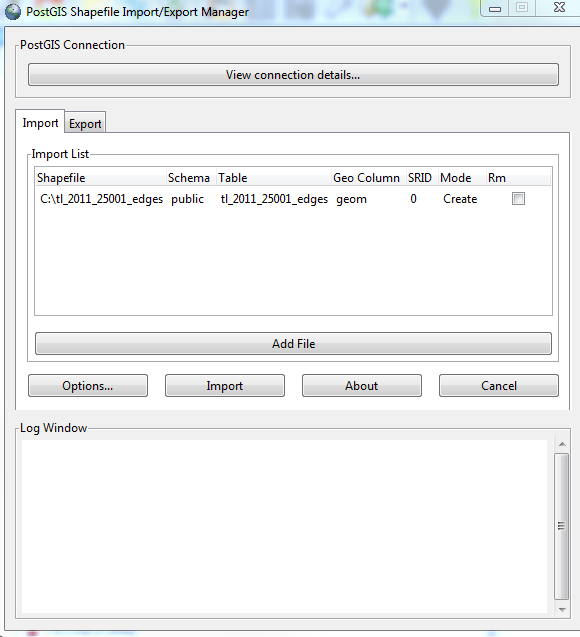


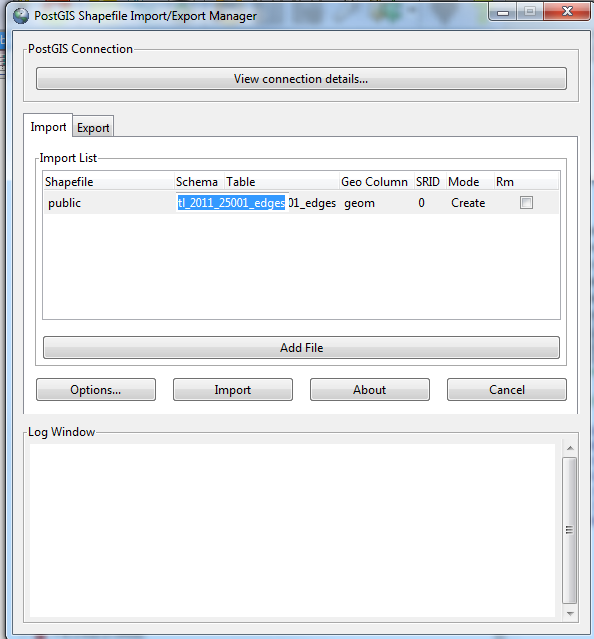

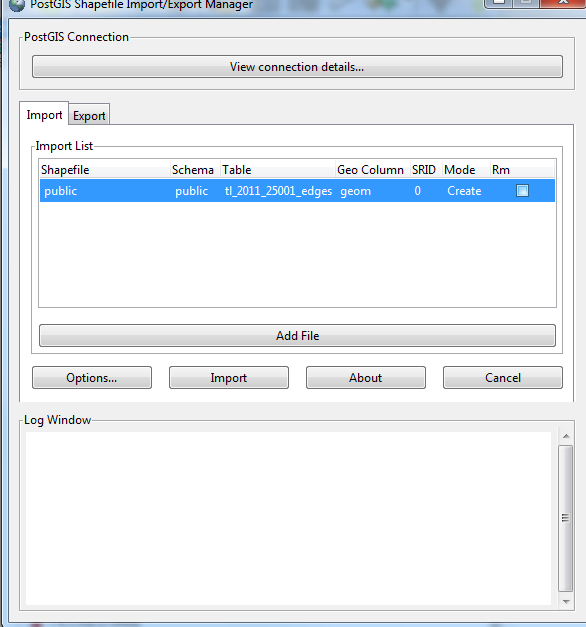
Okay I see the issue here now. It's the tabs are not opaque so the options in the export tab are leaking into the import tab so when you use the drop down, you sometimes accidentally hit the one for export geometry column.
Not sure how easy of a fix this is. It's not that big of a deal though just kinda confusing.