
Opened 17 years ago
Closed 13 years ago
#502 closed defect (fixed)
Feature Join rendering can be momentarily broken due to incorrect case on secondary attribute
| Reported by: | jng | Owned by: | brucedechant |
|---|---|---|---|
| Priority: | high | Milestone: | |
| Component: | General | Version: | 2.0.0 |
| Severity: | critical | Keywords: | feature join |
| Cc: | External ID: |
Description 
Consider a primary feature source with the following sample data.
| ID |
| A001 |
| A002 |
| A003 |
| A004 |
| A005 |
| A006 |
| .... |
| A194 |
Now consider that we are joining to a secondary feature source via ODBC, with the following sample data.
| ID | Value |
| A001 | A |
| A002 | C |
| A003 | A |
| .... | .. |
| A015 | B |
| a016 | C |
| A017 | A |
| A018 | C |
| .... | .. |
| A044 | A |
Suppose now we create a layer off of this joined feature source and theming on the values of the "Value" property, including a default style.
If you preview this layer, you'll notice a "break" at A016 (as it doesn't have a corresponding match) which is fine, but a fair amount of features "after" A016 (number unknown) will also be NULL on the ODBC side, until rendering resumes normally, see attached image for a visual explaination.
If you were to view this data via the schema report, the joined class would look something like...
| ID | Joined_ID | Joined_Value |
| A001 | A001 | A |
| A002 | A002 | C |
| A003 | A003 | A |
....
| A015 | A015 | B |
| A016 | NULL | NULL <--- Correct, there is no corresponding match |
| A017 | NULL | NULL <--- This is not correct, there is a corresponding match. |
| A018 | NULL | NULL <--- Ditto |
.... Some features later....
| A044 | A044 | A |
If the a016 was changed to A016 on the ODBC side, the feature join will render normally.
Change History (7)
by , 17 years ago
comment:1 by , 17 years ago
| Owner: | set to |
|---|
comment:2 by , 17 years ago
| Resolution: | → wontfix |
|---|---|
| Status: | new → closed |
This is as expected because the join keys are strings. When strings are used as keys they are case sensitive. This is one of the dangers in using a non numeric key.
comment:3 by , 17 years ago
I understand that join keys are case-sensitive, but should it be null-ing the valid secondary rows after that bad key (A016) ?
comment:4 by , 17 years ago
| Resolution: | wontfix |
|---|---|
| Status: | closed → reopened |
In 1st reading this I missed a very important detail. Thank you for pointing that out.
I had a look at the code and the problem is the way the join algorithm tries to do a match. It essentially tries to compare A016 with a016 and doesn't match so it ends up advancing the primary and tries to find something that matches with a016, but because of the way string comparisons work all the capital letters are less than all of the lower cse letters and so everything in the primary after this point never finds a match in the secondary.
I am going to reopen this as it is definitely a defect.
comment:5 by , 15 years ago
Please re-test against 2.1 and let us know if this is still an issue. Will close this ticket if no response by next ticket cleanup cycle.
comment:6 by , 13 years ago
| Resolution: | → fixed |
|---|---|
| Status: | reopened → closed |
The original data that produced this problem was a SHP to MS Access join. This type of join results in the problematic batch sorted block join algorithm.
r6333 and r6348 means this such a join no longer use this algorithm. Coupled with a workaround of ensuring all keys being joined are in the proper case. This is pretty much resolved.


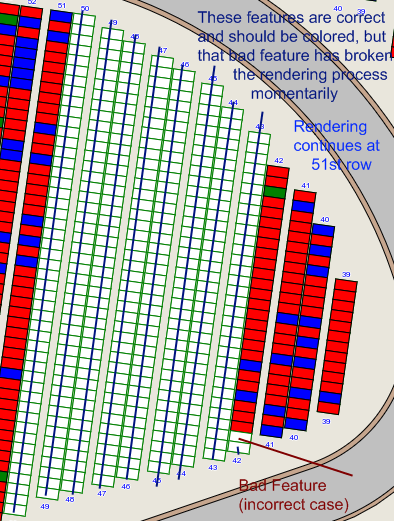
Image describing the join rendering bug