
Opened 12 years ago
Closed 6 years ago
#4442 closed defect (fixed)
Warping onto an image with GCPs or geolocation array does not work
| Reported by: | korosov | Owned by: | warmerdam |
|---|---|---|---|
| Priority: | normal | Milestone: | |
| Component: | GDAL_Raster | Version: | svn-trunk |
| Severity: | normal | Keywords: | |
| Cc: | knutfrode, antonio |
Description
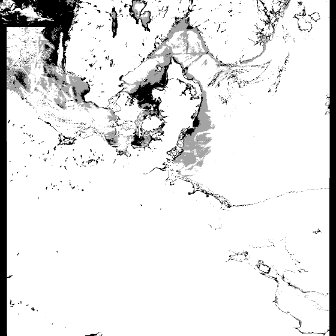
When I try to warp either projected image (e.g. Global DEM) or unprojected image (e.g. L1B MERIS or MODIS image) onto another UNprojected image (e.g. MODIS or MERIS image with GCPs or geolocation arrays) both the command line utility 'gdalwarp' and the function from the Python bindings 'ReprojectImage' produce wrong results: the images are not colocated correctly but the source image is small and placed in the top left corner of the destination image.
Sample input data:
Source projected image: Global DEM at 1/12 degree resolution, 120MB (alwdgg.tif) http://www.eea.europa.eu/data-and-maps/data/world-digital-elevation-model-etopo5/zipped-dem-geotiff-raster-geographic-tag-image-file-format-raster-data/
Destination unprojected image: Envisat/MERIS at 1200 m resolution, 29MB (MER_RR2PNPDK20030809_100609_000022512018_00466_07534_3898.N1) http://envisat.esa.int/services/sample_products/meris/RR/L2/
- Try with gdalwarp:
#make writable copy of the destination image with one band only:
gdal_translate MER_RR__2PNPDK20030809_100609_000022512018_00466_07534_3898.N1 -b 1 meris_dst_01.tif

#reproject global dem onto unprojected image with GCPs
gdalwarp alwdgg.tif meris_dst_01.tif
The updated image meris_dst_01.tif contains small map of the world in the upper left corner.
- Try with Python bindings
GCPfile='MER_RR__2PNPDK20030809_100609_000022512018_00466_07534_3898.N1'
geotransformfile = 'alwdgg.tif'
outfile = 'meris_dst_02.tif'

# open input datasets
src_ds = gdal.Open(geotransformfile)
dst_ds = gdal.Open(GCPfile)

# create writable copy of the destination image
driver = gdal.GetDriverByName( "GTiff" )
out_ds = driver.CreateCopy(outfile, dst_ds, 0 )

# reproject onto destination image with GCPs
gdal.ReprojectImage(src_ds, out_ds)
The created image meris_dst_02.tif contains small map of the world in the upper left corner.
Attachments (1)
Change History (7)
by , 12 years ago
| Attachment: | meris_dst_01.jpg added |
|---|
comment:1 by , 12 years ago
| Cc: | added |
|---|
comment:2 by , 12 years ago
Warping on an image with GCPs or geolocation array is not supported, and I'm not aware of anyone working to support that.
You can try the following :
gdal_translate MER_RR__2PNPDK20030809_100609_000022512018_00466_07534_3898.N1 -b 1 meris_dst_01.tif
# meris_dst_01.tif is unsigned int16, but alwdgg.tif is signed int16, so pick up a larger data type, such as Int32
gdalwarp meris_dst_01.tif meris_dst_01_warped.tif -ot Int32
gdalwarp DEM_geotiff/alwdgg.tif meris_dst_01_warped.tif
But I'm not sure why you want to do that. The alwdgg then covers completely the meris image.
comment:3 by , 12 years ago
Your solution works, Even, but it involves reprojecting (warping) of the GCP image (MERIS). Here is an explanation of why we want to avoid this reprojection:
Our main concern is to run scientific algorithms to produce geophysical variables derived from raw satellite observations (e.g. MERIS, MODIS or Radarsat). This corresponds to conversion from "level 1" to "level 2" in the standard terminology used in remote sensing.
To comply strictly with definition of "level 2" products, the data should thus not be reprojected. Still, it is often needed to bring in (i.e. warp) auxiliary data for the scientific algorithm, such as data from another satellite image, or from a DEM or a model field.
However, there are also practical reasons why warping is not desired: satellite images can be very long stripes which do not fit well on a projection. Especially at high latitudes the warped image will contain a lot of whitespace ("blackspace"), and the satellite image itself may in some cases cover less than 10% of the output image area. On some of my tests, GDAL also failed to compute a transformation.
As explained in this forum post, the stepwise projection onto a GCP-image does indeed work, so hopefully in the future someone (or ourselves) will be able to also implement a direct warping which would work for gdalwarp and gdal.ReprojectImage. In the meantime, Anton Korosov has found a workaround for the Python API, which he will post below.
comment:4 by , 12 years ago
For reprojection of an source image in latlong projection (e.g. DEM of Europe) onto a destination image with GCPS (e.g. MODIS L1B image) I did the following steps:
- Get GCPs from MODIS
- For each GCP: calculate values of Pixel/Line on EUROPE for the lat/lon from the GCP
- Make new GCPs where Pixel/Line are from EUROPE and X/Y are actually Pixel/Line but from MODIS
- Add these new GCPs to EUROPE
- Add 'fake' projection with units meters (e.g. stere) to these GCPs
- Remove GeoTransform completely
- Warp onto the grid with MODIS dimensions (e.g. -te 0 0 2030 1354 -tr 2030 1354)
In that case it produces DEM of Europe at the same resolution and projection as MODIS image.
This workaround is not a solution of course. And I hope the bug that prevents transformation of coordinates on the second step will be fixed. Here is this Python script if required: from osgeo import gdal, osr
fileName1 = '/Data/sat/GDAL_test/MER_RR2PNPDK20030809_100609_000022512018_00466_07534_3898.N1' fileName2 = '/Data/sat/GDAL_test/europe.tif'
#fileName1 = '/Data/sat/GDAL_test/RS2_20090227_063055_0080_SCWA_HHHV_SCW_30853_0000_1897838' #fileName2 = '/Data/sat/GDAL_test/gfs.t06z.master.grbf03'
ds1 = gdal.Open(fileName1) ds2 = gdal.Open(fileName2)
#create transformer for EUROPE #the transformer converts lat/lon to pixel/line proj4string = "+proj=longlat +ellps=WGS84 +datum=WGS84 +no_defs" trgSRS = osr.SpatialReference(); trgSRS.ImportFromProj4(proj4string); trgWkt = trgSRS.ExportToWkt(); transformer2 = gdal.Transformer(ds2, None, ['DST_SRS='+trgWkt])
#get GCPs from MERIS gcps = ds1.GetGCPs();
#create 'fake' GCPs for g in gcps:
#transform MERIS lat/lon to EUROPE pixel/line succ,point = transformer2.TransformPoint(1, g.GCPX, g.GCPY); pixel2 = point[0]; line2 = point[1];
print g.GCPPixel, g.GCPLine, g.GCPX, g.GCPY, pixel2, line2
#swap coordinates in GCPs: #pix1/line1 -> lat/lon =>=> pix2/line2 -> pix1/line1 g.GCPX = g.GCPPixel g.GCPY = g.GCPLine g.GCPPixel = pixel2 g.GCPLine = line2
#create VRT for EUROPE vrtDriver = gdal.GetDriverByName("VRT"); ds3 = vrtDriver.CreateCopy('test_raw.vrt', ds2); #add 'fake' STEREO projection to EUROPE srsString = "+proj=stere +lon_0=0 +lat_0=0 +k=1 +ellps=WGS84 +datum=WGS84 +no_defs"; srs = osr.SpatialReference(); srs.ImportFromProj4(srsString); #add 'fake' GCPs to EUROPE ds3.SetGCPs(gcps, srs.ExportToWkt()) ds3.SetProjection();
##!! MANUALY REMOVE THIS GEOTRANSFORM FROM THE EUROPE VRT FILE and save as test.vrt ds3.SetGeoTransform([0, 0, 0, 0, 0, 0]); ds3 = None
#PERFORM BELOW MANUALY """ #create warped VRT: #gdalwarp -t_srs "+proj=stere +lon_0=0 +lat_0=0 +k=1 +ellps=WGS84 +datum=WGS84 +no_defs" -tr 1 1 -te 0 0 1121 1121 test.vrt warpedtest.vrt -of VRT -overwrite
#Manualy modify GeoTranfrom and DstGeoTransform in the warpedtest.vrt to [0 1 0 0 0 1] (without minus for dY)
from osgeo import gdal, osr import matplotlib.pyplot as plt # Open warped VRT ds4 = gdal.Open('warpedtest.vrt') #get array and show data = ds4.GetRasterBand(1).ReadAsArray(); plt.imshow(data) plt.show() """
comment:5 by , 11 years ago
| Cc: | added |
|---|
comment:6 by , 6 years ago
| Resolution: | → fixed |
|---|---|
| Status: | new → closed |
Should work in recent GDAL versions
gdal_translate ../autotest/gcore/data/gcps.vrt test.tif
gdal_translate test.tif test2.tif -scale 0 255 0 0
gdalwarp test.tif test2.tif


Result image with enhanced contrast with dark world map in the upper-left corner