
Opened 13 years ago
Last modified 13 years ago
#3468 new bug
Missing layer in project means I can't load project at all
| Reported by: | arencambre | Owned by: | timlinux |
|---|---|---|---|
| Priority: | major: does not work as expected | Milestone: | Version 1.7.0 |
| Component: | Project Loading / Saving | Version: | 1.6.0 |
| Keywords: | Cc: | aren@…, timlinux | |
| Must Fix for Release: | No | Platform: | Windows |
| Platform Version: | 7 | Awaiting user input: | no |
Description
I have a project with 5 layers. One is a ShapeFile that I inadvertently deleted.
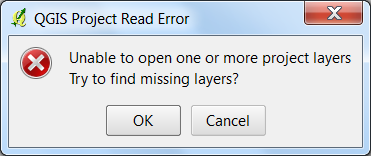
When the project loads, I get a QGIS Project Read Error dialog. See attached image. If I select Cancel, then the entire project is unloaded. If I press OK but cannot locate the ShapeFile (and I can't because, again, I deleted it) and hit Cancel in the file browsing dialog, then the project also unloads.
If I press Cancel, or if I press OK but cannot find the project, I should at least have the project loaded without the missing layer. Right now, my project is completely unusable until I restore the ShapeFile.
Attachments (1)
Change History (6)
by , 13 years ago
| Attachment: | qgis_error.png added |
|---|
comment:1 by , 13 years ago
comment:2 by , 13 years ago
| Owner: | changed from to |
|---|
comment:3 by , 13 years ago
The layers which are existing are loaded in mapcanvas and when it found any missing layer the added layers are getting removed I went through the source code , But I could not found the LINE of CODE , which does the function of removing the added layers ?. Can anyone help me to find the LINE of code , which help me to fix the BUG ?.
For missing layer the QgsMapLayer::readXML failed (because the data provider fails to initialize) and the layers aren't added to the map layer registry:
http://trac.osgeo.org/qgis/browser/trunk/qgis/src/core/qgsproject.cpp#L715
All such layer nodes are collected and later passed to
http://trac.osgeo.org/qgis/browser/trunk/qgis/src/gui/qgsprojectbadlayerguihandler.cpp#L16
which tries to update the datasource and reread the bad layer node.
comment:4 by , 13 years ago
| Cc: | added |
|---|
comment:5 by , 13 years ago
| Owner: | changed from to |
|---|
Hi
I committed the patch supplied by Sunilraj r15332 which partially addresses this. Sunil, note that if you choose 'OK' then 'Cancel' on the subsequent dialog, the project is returned to blank - I'm not sure if that would be expected behavior. I think it would be better to revert to 'ignore missing' behaviour if cancel is pressed on the file selection dialog.
I also tidied up the dialog wording a little in r15333.
Regards
Tim


I agree. This is not really best way to handle this kind of error. IMO a better approach would be to load the project but show some kind of missing icon next to the item in the legend and/or disable the item. Double clicking should open dialog to restore correct path.