
#1019 closed bug (worksforme)
QGis error when I close a ring
| Reported by: | Seba | Owned by: | leolami |
|---|---|---|---|
| Priority: | critical: causes crash or data corruption | Milestone: | |
| Component: | Vectors | Version: | 0.9.1 |
| Keywords: | Cc: | ||
| Must Fix for Release: | No | Platform: | Windows |
| Platform Version: | XP with SP2 | Awaiting user input: | yes |
Description
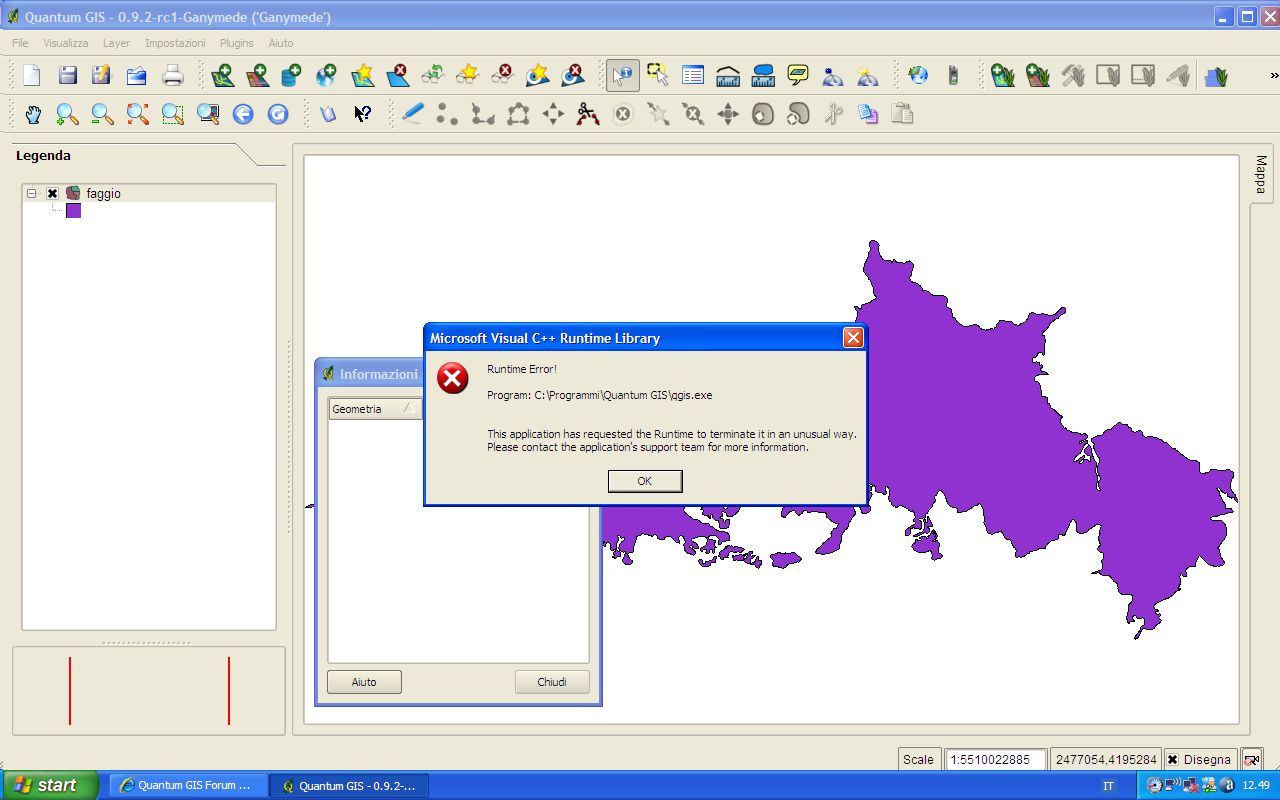
When I close the ring I created a polygon I get the following message and the program closes:
"Runtime error!
Program: C:\Programmi\QuantumGis\qgis.exe
Thi application has request Runtime to terminate it in an unusual way. Please contact the application's support team for more information."
Attachments (1)
Change History (8)
by , 16 years ago
| Attachment: | Errore qgis.jpg added |
|---|
follow-up: 2 comment:1 by , 16 years ago
| Awaiting user input: | set |
|---|
comment:2 by , 16 years ago
Replying to jef:
Which qgis build does this apply to and what data source were you using?
to version 0.9.1 and 0.9.2, I have used a shape created by me.
comment:3 by , 16 years ago
I curious about the "Microsoft Visual C++ Runtime Library" runtime error. Is this from a MSVC build?
comment:4 by , 16 years ago
When I have installed qgis has appeared the warning that python and PQt4 was not installed;can this error create that one?
comment:5 by , 16 years ago
I don't have Windows, but under WINE 1.0.0 on amd64 Debian testing I can't reproduce this error with Shapefile data using Marco's "QGIS 0.11.0 for Windows pre-release testing installer".
comment:6 by , 16 years ago
| Resolution: | → worksforme |
|---|---|
| Status: | new → closed |
I cannot reproduce this on Win XP with 0.9.2. If submitter feels the problem persists, please re-open this bug.


Which qgis build does this apply to and what data source were you using?