
Opened 13 years ago
Closed 12 years ago
#1404 closed defect (worksforme)
[raster] raster2pgsql overviews don't look right
| Reported by: | robe | Owned by: | pracine |
|---|---|---|---|
| Priority: | medium | Milestone: | PostGIS 2.1.0 |
| Component: | raster | Version: | master |
| Keywords: | Cc: |
Description 
This could be an issue with just windows. But I'm finding that some of my main tiles do not intersect my overviews and on closer inspection my overviews look like they are missing parts.
See attached that shows this query.
The overview tile that this rast is in and my 593 rid rast
SELECT rast
FROM (SELECT * from aerials.o_2_boston WHERE ST_Intersects(rast,(SELECT rast FROM aerials.boston WHERE rid = 593) )  ) as foo;
I don't think I had this issue with the raster2pgsql.py. Then again could be the way I have my original files laid out, but that doesn't explain why some aerial tiles with obvious data in them are not intersecting the overviews.
Change History (34)
by , 13 years ago
by , 13 years ago
| Attachment: | o_containing_593.png added |
|---|
comment:1 by , 13 years ago
comment:2 by , 13 years ago
I'll have to test with my "test" raster. The loader generates overviews using each raster file (rather than a tile) through an in-memory VRT file.
comment:3 by , 13 years ago
I've double-checked the outputted overviews by comparing them to the intermediate VRT files (dumped to disk) and everything matches out. I also loaded the VRT files into qgis and they're absolutely correct.
I've attached my test raster so that you can test it.
by , 13 years ago
| Attachment: | TMIN-20100730.tif added |
|---|
Test raster for overview generated at factor 2
comment:4 by , 13 years ago
okay I'll give these a try. You think its a rounding issue. These were the same ones I was using where the constraints didn't work originally until we put in the round feature.
comment:5 by , 13 years ago
Bborie,
I've attached one of the full tiles I was testing with. I have to add not sure it makes a difference, that these were originally MrSID, but since I don't have a sid driver compiled into my raster2pgsql I converted them to jpeg before processing them. That was the case with raster2pgsql.py too so don't think that would completely explain it.
comment:6 by , 13 years ago
robe,
I've processed the sample aerial you attached using the following:
raster2pgsql -s 26986 -t 100x100 -F -l 2 -I -Y 23128870.sid.jpg aerial > aerial.sql
On qgis with a modified PostGIS Raster plugin (to support the latest raster_columns and raster_overviews, I can zip the python files and pass it to you if you want), everything (base raster and overview) looks good. I also checked the vector representations of the base raster and overview in qgis and everything is where you'd expect them to be.
Your aerial did find a bug in the ST_SameAlignment code though that I had to fix.
Got to love floating point quirks as the same reference raster of mine never caused me any of the rounding issues.
comment:7 by , 13 years ago
Bborie,
Okay this is very annoying. That works fine, but if I process 3 files together I get the strange behavior.
Can you download this zip file and see if you get the same behavior. http://www.bostongis.com/downloads/bostonaerials2008.zip
This is the command I was using
raster2pgsql -I -C -F -Y -s 26986 -t 200x200 bostonaerials2008\*.jpg -l 2,4 aerials.boston | psql -U postgres -d postgis20_sampler -h localhost -p 5441
comment:8 by , 13 years ago
I've tested the set of rasters using the your command with the switches and options in the same order (forward-slash instead of back-slash).
raster2pgsql -I -C -F -Y -s 26986 -t 200x200 bostonaerials/*.jpg -l 2,4 boston
I'm not seeing any issues spatially nor in terms of the pixels through qgis.
One possibility is to try dumping the VRT files so that I can inspect them. Replace the raster2pgsql.c with the one attached which has the overview VRTs being dumped into /tmp, recompile and test.
comment:9 by , 13 years ago
Would you believe its the slash?
I'm retesting again to confirm, but when I used your command — using UNIX slash convention /*.jpg instead of \*.jpg then it worked fine and my overviews look right.
I'm not sure this is worth fixing unless its an easy fix. If not I'll just put a note in the docs for windows users to make sure they are using Unix slashes.
I think for unix folks the command would completely fail anyway.
comment:10 by , 13 years ago
No way! What I don't get is why the loader still seems to work. If there was a "path" issue, the loader should have failed as it couldn't find the raster file. I'll have to see if converting all single backslashes when in windows will help.
comment:11 by , 13 years ago
| Resolution: | → fixed |
|---|---|
| Status: | new → closed |
Okay its not that either. Bborie — sorry I have no idea why it's working now but doesn't seem to matter which slash I use. The same alignment thing you fixed wouldn't have had anything to do with it would it. I thought I might be using an older executable before.
I thought maybe it was the extra space but that didn't cause it to fail either.
I'll close this out for now until I can replicate the issue again. I'm going to test with the other server I have that has the released windows install and see if I still see the same issue and then replace with trunk and see if it still exhibits the issue
comment:12 by , 13 years ago
The alignment issue had nothing to do with the loader. I noticed that the alignment constraint was not being applied though it should have absolutely worked.
Instead of using the wildcard  when passing in the rasters to the loader, could you explicitly provide the files? Tedious yes, but I wonder if the shell's expansion of the wildcard is having issues. The loader itself does no wildcard expansion.
comment:13 by , 13 years ago
It must have been something that changed recently in either raster or core postgis I think. I checked the transforms on the server I was testing with and my transformed data was exhibiting the same issue of half the image was missing. I then replaced the dlls with the one I just recently compiled, and the transform issue was gone.
I haven't had a chance to reload my aerial data on this box with the overviews, but I suspect whatever was giving me goofy transform results might have been causing the overview issue as well.
comment:14 by , 13 years ago
Note my box was using the last set of binaries I deployed on the site and those were dated around 12/16 so something must have happened between 12/16 and now and probably more like in the last day or 2 since my local machine I compile much more frequently.
comment:15 by , 13 years ago
Strange. I've made a few changes to the code underlying raster transform in the last day or two but I don't believe that would have affected your issues. What is possibly more significant is that I fixed up the make targets "uninstall" and "distclean" as I found that they weren't thorough in cleaning things up.
comment:16 by , 13 years ago
hmm will replacing the binaries on my other box didn't work for the raster2pgsql issue. Even replaced and rebooted. I wonder if its that prefetch cache windows keeps somewhere or the fact I didn't run the upgrade script. I think I might have run the upgrade script on my dev box before I reran the raster2pgsql test again. I'll do that next.
comment:17 by , 13 years ago
| Resolution: | fixed |
|---|---|
| Status: | closed → reopened |
Okay I think after much head scratching, flipping binaries, renaming binaries, restarting servers, going back and forth the answer is is as they say "The most probable one". It has something to do with the order of the args or args used.
I realized that when I cut and pasted from this ticket, things worked, but yet my script did not so I must have made a transcription error. After isolating all the switches I was using,
I realized my script was not using the -Y option. Can you test on yours?
good
raster2pgsql -I -e -C -F -Y -s 26986 -t 200x200 -l 2 23128870.sid.jpg boston_test7 | psql
bad
raster2pgsql -I -e -F -C -s 26986 -t 200x200 -l 2 23128870.sid.jpg boston_test8 | psql
I was fiddling with the order of args as well, but I concluded that that didn't seem to make a difference.
I'm reopening this ticket since I think there is something wrong, but not quite sure what.
comment:18 by , 13 years ago
Yes. You are correct. Something is up with the INSERT version. Unlike the COPY version that has no issues, the INSERT version has constraint issues.
I'm using the following:
COPY
raster2pgsql -I -e -C -F -Y -s 26986 -t 200x200 -l 2 23128870.sid.jpg boston_test7 > copy.sql
INSERT
raster2pgsql -I -e -C -F -s 26986 -t 200x200 -l 2 23128870.sid.jpg boston_test8 > insert.sql
BUT if I remove the overview switch from the INSERT statements loader, the constraint errors go away.
I'll do some debugging.
comment:19 by , 13 years ago
Can you try r8598? I found a bug that was causing overview tiles to end up in the base raster's table.
comment:20 by , 13 years ago
| Resolution: | → fixed |
|---|---|
| Status: | reopened → closed |
yap that fixes the issue. Thanks, Regina
comment:21 by , 13 years ago
| Resolution: | fixed |
|---|---|
| Status: | closed → reopened |
Testing r8619(on windows) I'm still observing some funkiness with overviews which seems sensitive to how I pick my chopping dimensions. The tile I have is 5000x5000 pixels so it should in theory be nicely divisible by 125x125.
I built two datasets like so and I was surprised to find that my 125x125 base and overview doesn't seem to ST_Intersect yet I do get reasonable && answers
raster2pgsql -I -e -F -C -Y -s 26986 -t 125x125 -l 2 23128870.sid.jpg boston_test_125_125_Y | %PSQL%

raster2pgsql -I -e -F -C -Y -s 26986 -t 200x200 -l 2 23128870.sid.jpg boston_test_200_200_Y | %PSQL%
If I do a regular && check and compare to answer returned by intersects:
-- returns 12 | 0
SELECT  Count(o2.rast) AS bbox_inter
	, COUNT(CASE WHEN ST_Intersects(o.rast, o2.rast) THEN 1 ELSE NULL END) As inter
 FROM boston_test_125_125_Y As o INNER JOIN
	o_2_boston_test_125_125_Y AS o2 ON o.rast && o2.rast
WHERE ST_Intersects(o2.rast, ST_SetSRID(ST_Point(231724, 886309), 26986));


-- returns 8, 6
SELECT  Count(o2.rast) AS bbox_inter
	, COUNT(CASE WHEN ST_Intersects(o.rast, o2.rast) THEN 1 ELSE NULL END) As inter
 FROM boston_test_200_200_Y As o INNER JOIN
	o_2_boston_test_200_200_Y AS o2 ON o.rast && o2.rast
WHERE ST_Intersects(o2.rast, ST_SetSRID(ST_Point(231724, 886309), 26986));
I have no clue what _ST_Intersects is doing except I can only assume that since && overshoots (the bounding box is a little bigger — I will get some false positives - so 200x200 makes some sense, but why my 125x125 returns nothing is kind of disturbing.)
comment:22 by , 13 years ago
Slight corrections — these are the queries I meant to post.
{{{ — returns 4, 0 SELECT Count(o2.rast) AS bbox_inter
, COUNT(CASE WHEN ST_Intersects(o.rast, o2.rast) THEN 1 ELSE NULL END) As inter
FROM boston_test_125_125_Y As o INNER JOIN
o_2_boston_test_125_125_Y AS o2 ON o.rast && o2.rast
WHERE ST_Intersects(o.rast, ST_SetSRID(ST_Point(231724, 886309), 26986));
— returns 4,4 SELECT Count(o2.rast) AS bbox_inter
, COUNT(CASE WHEN ST_Intersects(o.rast, o2.rast) THEN 1 ELSE NULL END) As inter
FROM boston_test_200_200_Y As o INNER JOIN
o_2_boston_test_200_200_Y AS o2 ON o.rast && o2.rast
WHERE ST_Intersects(o.rast, ST_SetSRID(ST_Point(231724, 886309), 26986)); }}}
comment:23 by , 13 years ago
Let me try again.
-- returns 4, 0 SELECT Count(o2.rast) AS bbox_inter

    , COUNT(CASE WHEN ST_Intersects(o.rast, o2.rast) THEN 1 ELSE NULL END) As inter

    FROM boston_test_125_125_Y As o INNER JOIN

        o_2_boston_test_125_125_Y AS o2 ON o.rast && o2.rast

WHERE ST_Intersects(o.rast, ST_SetSRID(ST_Point(231724, 886309), 26986));

-- returns 4,4 SELECT Count(o2.rast) AS bbox_inter

    , COUNT(CASE WHEN ST_Intersects(o.rast, o2.rast) THEN 1 ELSE NULL END) As inter

    FROM boston_test_200_200_Y As o INNER JOIN

        o_2_boston_test_200_200_Y AS o2 ON o.rast && o2.rast

WHERE ST_Intersects(o.rast, ST_SetSRID(ST_Point(231724, 886309), 26986));
comment:24 by , 13 years ago
Strange. For the first query, I get (4, 2) where you're getting (4, 0). For the second query, I get the same result as you (4, 4).
By the looks of it, I don't think this is an overview/loader issue anymore but rather an ST_Intersects error so maybe we should move this to a new ticket. I'll have to do some thinking about this. I'm guessing there is some floating-point issue when the sampling occurs around an intersection point. Ideally, can you rebuild your PostGIS with —enable-debug and run the first query? Having the debug output to compare with my debug output would be great.
comment:25 by , 13 years ago
If you want to look at the details of what goes on under the hood of _st_intersects, look at the working docs for ST_Intersects.
http://trac.osgeo.org/postgis/wiki/WKTRaster/SpecificationWorking03
comment:26 by , 13 years ago
| Milestone: | PostGIS 2.0.0 → PostGIS Raster 2.0.1 |
|---|
I'll relook at this later
comment:27 by , 13 years ago
| Milestone: | PostGIS Raster 2.0.1 → PostGIS 2.0.1 |
|---|
comment:28 by , 13 years ago
| Milestone: | PostGIS 2.0.1 → PostGIS 2.1.0 |
|---|
comment:29 by , 12 years ago
| Resolution: | → worksforme |
|---|---|
| Status: | reopened → closed |
I haven't had issues to my knowledge with overviews except possibly for those .3333333 things. I'm going to dismiss this one and reopen if I can recreate.


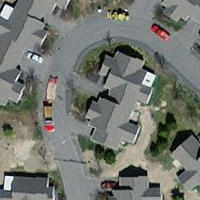

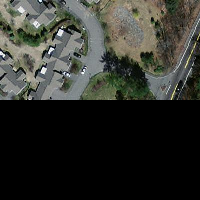
forgot to mention another bit of info. According to my intersection check — this overview is the only tile that intersects with my original tile, yet parts of my original tile are not accounted for in this overview tile.