
#40 closed defect (worksforme)
Copy button on wxgrass function forms does not work
| Reported by: | brian | Owned by: | |
|---|---|---|---|
| Priority: | minor | Milestone: | 6.4.0 |
| Component: | wxGUI | Version: | svn-develbranch6 |
| Keywords: | wxgrass | Cc: | |
| CPU: | All | Platform: | Linux |
Description 
Copy to clipboard button on wxgrass function forms, e.g.v.in.ascii, does not work. Cannot copy the command. Current Grass63 svn. O/S = Ubuntu 7.10 wxpython = 2.8.7.1 Happens
Same behaviour on Mandriva 2008.
Change History (15)
comment:1 by , 17 years ago
| Component: | default → Python |
|---|
comment:2 by , 17 years ago
Hi Martin Still no copy even with latest builds, i.e the copy button does nothing.
Using: Python 2.5.1 wxPython 2.8.7.1
Cheers Brian
by , 17 years ago
| Attachment: | Screenshot-v.in.dxf [vector, import]-2.png added |
|---|
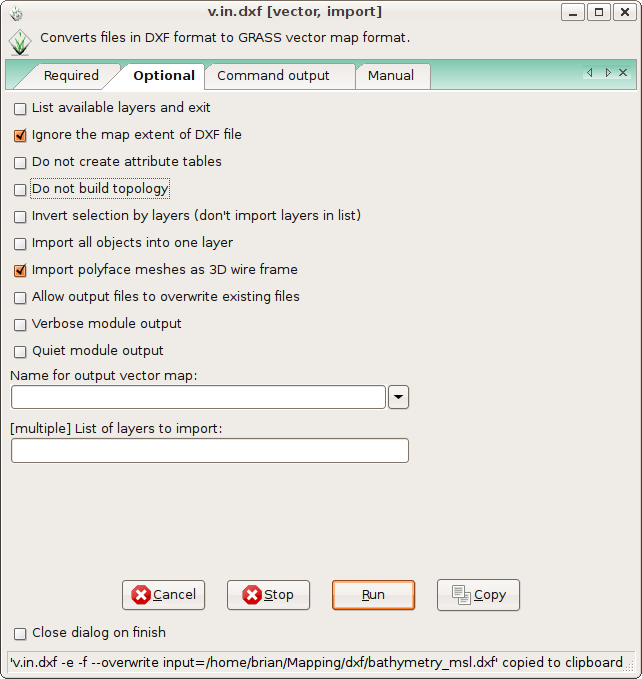
screenshot of v.in.dxf
follow-up: 4 comment:3 by , 17 years ago
Using Ubuntu Hardy.
Still same error. Cannot copy to clipboard from any wxpython form. See attached screen shot:
follow-up: 6 comment:4 by , 17 years ago
Replying to brian:
Still same error. Cannot copy to clipboard from any wxpython form. See attached screen shot:
From attached screenshot I don't see anything strange. I don't fully understand what is broken.
- launch GUI dialog
- set required parameters
- 'Copy'
- e.g. paste data from clipboard to xterm, works
- close dialog -> clipboard empty
?
Martin
comment:5 by , 17 years ago
| Component: | Python → wxGUI |
|---|
comment:6 by , 17 years ago
Replying to martinl: The screenshot shows the form after the copy button is pressed. Although the bottom of the screenshot shows "copied to clipboard", there is nothing in the clipboard and no error message.
Brian
Replying to brian:
Still same error. Cannot copy to clipboard from any wxpython form. See attached screen shot:
From attached screenshot I don't see anything strange. I don't fully understand what is broken.
- launch GUI dialog
- set required parameters
- 'Copy'
- e.g. paste data from clipboard to xterm, works
- close dialog -> clipboard empty
?
Martin
follow-up: 8 comment:7 by , 17 years ago
| CPU: | → Unspecified |
|---|---|
| Platform: | → Unspecified |
On Debian testing, amd64, python-wxgtk 2.8.8.1 after pressing 'Copy' button there is also nothing in the clipboard that could be pasted into e.g. a terminal with "right click > paste", but I can paste with middle mouse button (both develbranch6 and trunk).
comment:8 by , 17 years ago
Replying to msieczka:
On Debian testing, amd64, python-wxgtk 2.8.8.1 after pressing 'Copy' button there is also nothing in the clipboard that could be pasted into e.g. a terminal with "right click > paste", but I can paste with middle mouse button (both develbranch6 and trunk).
That's due to the use of wx.TheClipboard.UsePrimarySelection(True) in mainFrame.OnCopy(). source:/grass/trunk/gui/wxpython/gui_modules/menuform.py@32365#L817
This causes the data to be copied to the primary selection rather than the clipboard. An explicit "copy" operation should use the clipboard (this is how Ctrl-C or Ctrl-Insert normally behave); the primary selection is for the selection.
comment:9 by , 17 years ago
Works on Mac in trunk and no changes to copy AFAIK. Is this still an issue in other contexts?
comment:10 by , 17 years ago
| CPU: | Unspecified → x86-32 |
|---|---|
| Platform: | Unspecified → Linux |
Still an issue on Ubuntu 8.04. Confirm that copy button on form does not copy data to clipboard, however ctrl-middle mouse button will paste to terminal. IMHO this should work the same as the tcltk gui and allow paste from ctrl-v or right click.
comment:11 by , 17 years ago
| CPU: | x86-32 → All |
|---|---|
| Version: | svn-trunk → svn-develbranch6 |
Also still an issue on Debian testing amd64 with a recent develbranch6 r33280.
follow-up: 13 comment:12 by , 16 years ago
| Resolution: | → worksforme |
|---|---|
| Status: | new → closed |
I commented out the line wx.TheClipboard.UsePrimarySelection(True) in r35120 (develbranch_6). It works fine on the Mac. Please test to see if it works OK on Linux now. If so, we can backport to releasebranch and grass 7.
comment:13 by , 16 years ago
Replying to cmbarton:
I commented out the line wx.TheClipboard.UsePrimarySelection(True) in r35120 (develbranch_6). It works fine on the Mac. Please test to see if it works OK on Linux now. If so, we can backport to releasebranch and grass 7.
Works fine on Debian testing too. Thanks.

![Screenshot-v.in.dxf [vector, import]-2.png](/grass/attachment/ticket/40/Screenshot-v.in.dxf%20%5Bvector%2C%20import%5D-2.png)
Hi,
can you provide more detailed info? I cannot reproduce this behaviour (Debian GNU/Linux, Python 2.4, wxPython 2.8.7.1). Here copying to clipboard works. Martin