
#306 closed defect (fixed)
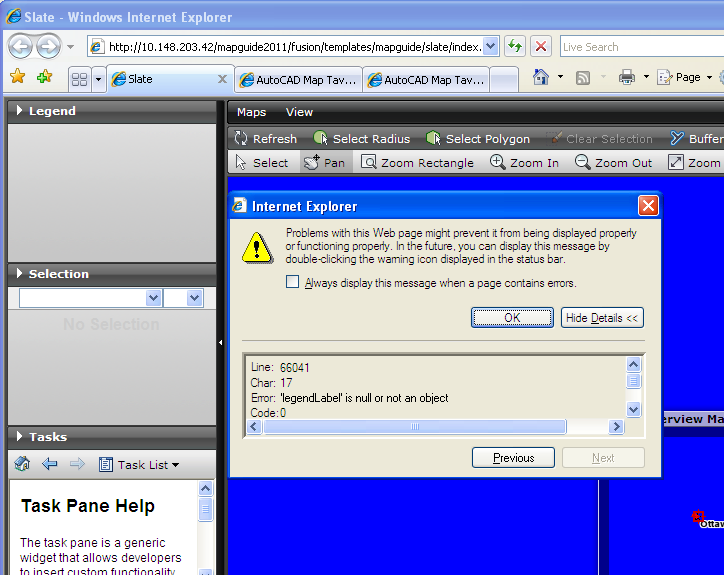
Legend panel is empty with Raster/WMS data source
| Reported by: | jennyhe | Owned by: | madair |
|---|---|---|---|
| Priority: | P2 | Milestone: | 2.0 |
| Component: | Widgets | Version: | 1.1.1 |
| Severity: | Major | Keywords: | |
| Cc: | madair@… | Browser: | All |
| External ID: | 1263361 | Operating System: | All |
| state: | Committed |
Description
From Autodesk QA
Stepts:
- Create one connection to WMS.
http://wms1.agr.gc.ca/cgi-bin/mapplant2000_f
- New layer with any data source -> New Map->New Flexible Web layout
- Open the web layout in IE
Results: Legend panel is empty and one error message from IE.
Expected results: Legend panel should display the layer item.
Workaround: N Regression:Y G21.6 works correctly.
Attachments (5)
Change History (19)
by , 15 years ago
| Attachment: | legend_panel.PNG added |
|---|
comment:1 by , 15 years ago
| Resolution: | → fixed |
|---|---|
| Status: | new → closed |
comment:2 by , 15 years ago
| Resolution: | fixed |
|---|---|
| Status: | closed → reopened |
comment:3 by , 15 years ago
The displayed raster layer icon is incorrect. I reverted the changes in http://trac.osgeo.org/fusion/changeset/1934, and it works. It seems the defect was caused by no styles in raster layer. The code logic should be updated.
Thanks, Arthur
by , 15 years ago
| Attachment: | Patch306.patch added |
|---|
comment:4 by , 15 years ago
| Cc: | added |
|---|
Hi Paul,
Would you please review this patch for me? There's no reply from other experts, but I am not sure if my update might affect other functions.
Thanks,
Arthur
comment:5 by , 15 years ago
| Cc: | added |
|---|
I'll need to get this tested against mapserver, cc'ing Mike and Paul.
comment:6 by , 15 years ago
Hello all,
I would like to know if I could submit the code or not. Will this patch break the mapserver legend icon?
Thanks,
Arthur
by , 14 years ago
| Attachment: | RasterLayerIconInLegend.patch added |
|---|
by , 14 years ago
| Attachment: | RasterLayerIconInLegend.2.patch added |
|---|
by , 14 years ago
| Attachment: | RasterLayerIconInLegend.3.patch added |
|---|
comment:7 by , 14 years ago
comment:9 by , 14 years ago
| Resolution: | → fixed |
|---|---|
| Status: | reopened → closed |
comment:10 by , 14 years ago
| Resolution: | fixed |
|---|---|
| Status: | closed → reopened |
Hi Mike,
Jenny and I find that the DWF icon is not the displayed incorrectly which is a disabled icon
In Legend.js, to create raster and DWF icon,
        // MapGuide Raster and DWF layer
        if (layer.layerTypes[0] == 4 ) {
            if (style && style.staticIcon == Fusion.Constant.LAYER_DWF_TYPE) {
                opt.image = this.imgLayerDWFIcon;
            } else {
                opt.image = this.imgLayerRasterIcon;
            }
            opt.enabled = true;
        }
the DWF layer type 5 is never considered. Should be update to:
        // MapGuide Raster and DWF layer
        if(layer.layerTypes[0] == 4){
            opt.image = this.imgLayerRasterIcon;
            opt.enabled = true;
        } else if(layer.layerTypes[0] == 5){
            opt.image = this.imgLayerDWFIcon;
            opt.enabled = true;
        }
to create the check box for layers,
              if (checkbox) {
                 layer.legend.treeItem.checkBox.checked = layer.visible?true:false;
              if (layer.layerTypes[0] == 4 || range.styles.length > 0) {
                layer.legend.treeItem.checkBox.disabled = false;
              } else {
                layer.legend.treeItem.checkBox.disabled = true;
              }
            }
which should be:
              if (checkbox) {
                 layer.legend.treeItem.checkBox.checked = layer.visible?true:false;
              if (layer.layerTypes[0] == 4 || layer.layerTypes[0] == 5 || range.styles.length > 0) {
                layer.legend.treeItem.checkBox.disabled = false;
              } else {
                layer.legend.treeItem.checkBox.disabled = true;
              }
            }
I am not sure if it's a defect or by design, so would you please give me your opinion?
Thanks,
Arthur
comment:11 by , 14 years ago
| Cc: | removed |
|---|
comment:12 by , 14 years ago
The changes proposed make sense and I can verify that the Legend still works with MapServer, but it is difficult to test all the possibilities. If this fixes the issue for you and the Sheboygan legend still appears correctly I would say go ahead and make the change.
comment:13 by , 14 years ago
| Resolution: | → fixed |
|---|---|
| state: | New → Committed |
| Status: | reopened → closed |
Changeset [2108]
comment:14 by , 14 years ago
| Milestone: | Future → 2.0 |
|---|


Fixed in http://trac.osgeo.org/fusion/changeset/1934 by pdeschamps