
Opened 14 years ago
Closed 13 years ago
#2339 closed bug (duplicate)
QGis crashes when moving border between map canvas and overview map and "use render caching..." enabled
| Reported by: | kivih1 | Owned by: | |
|---|---|---|---|
| Priority: | critical: causes crash or data corruption | Milestone: | Version 1.6.0 |
| Component: | MapCanvas | Version: | Trunk |
| Keywords: | map canvas, overview window | Cc: | jekhor, Alister |
| Must Fix for Release: | Yes | Platform: | All |
| Platform Version: | SP3 | Awaiting user input: | no |
Description
when there are layers in the project and one or more layers is visible, and the Overview map is visible and docked (left or right), QGis crashes when trying to move the border between the canvas and the overview map. It is not necessary to have layers associated with the overview map for the program to crash.
Attachments (4)
Change History (31)
comment:1 by , 14 years ago
| Owner: | removed |
|---|
comment:2 by , 14 years ago
comment:3 by , 14 years ago
Tested under linux and windows, both with qgis 1.4 and trunk, overview window docked on both sides. Not reproducable here.
comment:4 by , 14 years ago
this is strange: I can't reproduce it on my computer at work, but it's still there on my private computer (which is only 3 months old). Maybe it has to do with the graphica card? Anyway, the very same project loaded in Qgis 1.3 behaves OK, whereas it crashes in 1.4. I will do some more experimentation in the coming weeks, and will report when I have any news.
Hubert
comment:5 by , 14 years ago
Hi, it would be great to see what the console returns when qgis crashes. Do you have any linux installation in your pc?
by , 14 years ago
| Attachment: | 5c5e_appcompat.txt added |
|---|
Additional information added to the error report
comment:6 by , 14 years ago
Lutra,
I don't have Linux on my PC. This is what info I get from Windows after the crash:
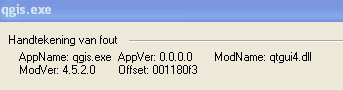
Error signature: see jpg in the appendix Exception information (the first part of it, too large to show all): see jpg Additional information added to the error report: see txt
It all makes no sense to me but I hope it does so to you!
Hubert
comment:7 by , 14 years ago
Still not able to replicate this on both windows (xp) and linux. Can you replicate the problem on more than one machine, in order to rule out local configuration problems?
comment:8 by , 14 years ago
I found out that Qgis only crashes when Actions->Options->Use cache when rendering is turned ON. When OFF no problems.
Hubert
comment:9 by , 14 years ago
| Platform: | Windows → All |
|---|---|
| Summary: | QGis crashes when moving border between map canvas and overview map → QGis crashes when moving border between map canvas and overview map and "use render caching..." enabled |
Ok, this is confirmed also under linux.
Terminal says
"Warning: QPaintDevice: Cannot destroy paint device that is being painted
Segmentation fault"
comment:10 by , 14 years ago
| Cc: | added |
|---|
follow-up: 14 comment:12 by , 14 years ago
comment:13 by , 14 years ago
| Cc: | added |
|---|
comment:14 by , 14 years ago
Replying to lutra:
Replying to jef:
might be related to #2714.
if the workaround for #2714 has fixed it then it does not work for this bug. It is pretty easy to reproduce on trunk but I also found vectors that do not cause qgis to crash.
I've just installed 1.5 and am unable to reproduce. N.B. that for me 1.4 only crashed sometimes - not every time I moved the border.
follow-up: 16 comment:15 by , 14 years ago
Unable to reproduce it using QGis trunk (r13958) on Ubuntu 9.04
follow-up: 17 comment:16 by , 14 years ago
Replying to brushtyler:
Unable to reproduce it using QGis trunk (r13958) on Ubuntu 9.04
Hi Giuseppe,
it is not replicable with all vectors. I also found vectors that do not cause the crash.
comment:17 by , 14 years ago
Replying to lutra:
Replying to brushtyler:
Unable to reproduce it using QGis trunk (r13958) on Ubuntu 9.04
Hi Giuseppe,
it is not replicable with all vectors. I also found vectors that do not cause the crash.
I tried more than one vector but nothing.
Could you attach a vector file which may cause the crash?
follow-up: 20 comment:18 by , 14 years ago
With this
http://www.iambiente.pt/atlas/dl/regista_dl.jsp?zona=continente&grupo=&tema=c_curvasnivel
for me is instant crash even with "Use cache when rendering" OFF.
I'm using qgis 1.5 under Ubuntu 10.04
gio@sibirica:~$ qgis
Python support ENABLED :-)
Loaded : GdalTools (package: GdalTools)
Warning: QHttp: empty path requested is invalid -- using '/'
Loaded : Plugin Installer (package: plugin_installer)
Loaded : fTools (package: fTools)
Loaded : OpenStreetMap plugin (package: osm)
Loaded : MapServer Export (package: mapserver_export)
gio@sibirica:~$ qgis
Python support ENABLED :-)
Loaded : GdalTools (package: GdalTools)
Warning: QHttp: empty path requested is invalid -- using '/'
Loaded : Plugin Installer (package: plugin_installer)
Loaded : fTools (package: fTools)
Loaded : OpenStreetMap plugin (package: osm)
Loaded : MapServer Export (package: mapserver_export)
Warning: QPixmap::operator=: Cannot assign to pixmap during painting
Warning: QPainter::begin: A paint device can only be painted by one painter at a time.
Warning: QPainter::end: Painter not active, aborted
Warning: QPixmap::operator=: Cannot assign to pixmap during painting
Warning: QPainter::begin: A paint device can only be painted by one painter at a time.
Warning: QPainter::end: Painter not active, aborted
Warning: QPixmap::operator=: Cannot assign to pixmap during painting
Warning: QPainter::begin: A paint device can only be painted by one painter at a time.
Warning: QPainter::end: Painter not active, aborted
Warning: QPixmap::operator=: Cannot assign to pixmap during painting
Warning: QPainter::begin: A paint device can only be painted by one painter at a time.
Warning: QPainter::end: Painter not active, aborted
Warning: QPixmap::operator=: Cannot assign to pixmap during painting
Warning: QPainter::begin: A paint device can only be painted by one painter at a time.
Warning: QPainter::end: Painter not active, aborted
Segmentation fault
comment:19 by , 14 years ago
Ok, now I'm able to reproduce it too (QGis trunk r13958 on Ubuntu 9.04)
comment:20 by , 14 years ago
Replying to lutra:
With this
http://www.iambiente.pt/atlas/dl/regista_dl.jsp?zona=continente&grupo=&tema=c_curvasnivel
for me is instant crash even with "Use cache when rendering" OFF.
For me only if the cache render is enabled.
Before crash, the terminal displays this message:
"Warning: QPaintDevice: Cannot destroy paint device that is being painted
Segmentation fault"
This message is displayed from
/home/brushtyler/Projects/Work/Faunalia/qgis/qgis_unstable/src/core/qgsmaplayer.cpp: 848
delete mpCacheImage;
So I think that when the render is disabled the crash is related to a different issue.
comment:21 by , 14 years ago
| Milestone: | Version 1.5.0 → Version 1.6.0 |
|---|
comment:22 by , 14 years ago
Might be due to Qt? Could you please try again with current trunk, and report which Qt version you use?
follow-up: 24 comment:23 by , 14 years ago
tested again with trunk, on ubuntu 10.04 and 10.10 (different libqt4 versions), render caching on and off and it is always instant crash.
follow-up: 25 comment:24 by , 13 years ago
Replying to lutra:
tested again with trunk, on ubuntu 10.04 and 10.10 (different libqt4 versions), render caching on and off and it is always instant crash.
I made further tests. I found that segfault is dued to the processEvent() calls in QgsVectorLayer (QgsVectorLayer.cpp:1045).
Searching for similar Qt bugs, I found #2714 (maybe the same bug??), and also Martin wrote the problem is caused by processEvent(). The crash happens in Qt libraries.
I discovered another piece, it's caused by an invalid extra-call. If I add debug messages both before (QgsVectorLayer.cpp:1039) and after (QgsVectorLayer.cpp:1055) the qapp->processEvent() call I notice that there are N pre-call messages and N+1 post-call messages.
comment:25 by , 13 years ago
Replying to brushtyler:
I discovered another piece, it's caused by an invalid extra-call. If I add debug messages both before (QgsVectorLayer.cpp:1039) and after (QgsVectorLayer.cpp:1055) the qapp->processEvent() call I notice that there are N pre-call messages and N+1 post-call messages.
Found, no extra-call (would be very strange!), but it's a race condition, see the attachment.
comment:26 by , 13 years ago
Look at the attachment qgis_ticket_2339_bt:
at line 95 you can see the missing "before qApp->processEvents()"
and after a refreshing of the layer
at line 189 there's the related "after qApp->processEvents()"




no reproducable with r12663 here.