
Opened 16 years ago
Closed 15 years ago
#20 closed defect (worksforme)
Vector point shift in wxgrass after pan
| Reported by: | marisn | Owned by: | |
|---|---|---|---|
| Priority: | major | Milestone: | 6.4.0 |
| Component: | wxGUI | Version: | svn-trunk |
| Keywords: | wxgui | Cc: | |
| CPU: | Unspecified | Platform: | Unspecified |
Description
After panning around in wxgrass map window, some points are drawn shifted away from their location.
Steps to reproduce:
1) Add some line layer in wxgrass (i.e. roads from spearfish6);
2) Add some point layer (i.e. bugsites);
3) Take a screenshot;
4) Pan map;
5) Take a screenshot;
6) In Gimp (or any other raster manipulation soft) combine both screenshots in such way, that line layer features match;
7) Examine all point features and notice unsharp points - those are not drawn in same place as in first screenshot.
User may expect, that all points are drawn with same distances between them during pan.
GRASS svn trunk Revision: 29746
32bit Gentoo with wxpython-2.8.7.1
Attachments (1)
Change History (5)
by , 16 years ago
| Attachment: | wxgrass_point_bug.png added |
|---|
comment:1 by , 16 years ago
| Component: | default → Python |
|---|---|
| Keywords: | wxgui added |
| Milestone: | 6.3.0 → 6.4.0 |
comment:2 by , 16 years ago
| Component: | Python → wxGUI |
|---|
comment:3 by , 16 years ago
| CPU: | → Unspecified |
|---|---|
| Platform: | → Unspecified |
Can you still reproduce this bug with current wxGUI?
comment:4 by , 15 years ago
| Resolution: | → worksforme |
|---|---|
| Status: | new → closed |
This ticket is over a year and a half old and seems inactive. The display system has been regularly improved over this time. I just replicated the steps above on the current 6.4 (compiled a couple days ago) on a Mac and there is no shift. All vectors line up perfectly as far as I can see.
I'm changing this to fixed. If someone still has a problem, we can change it back.
Michael


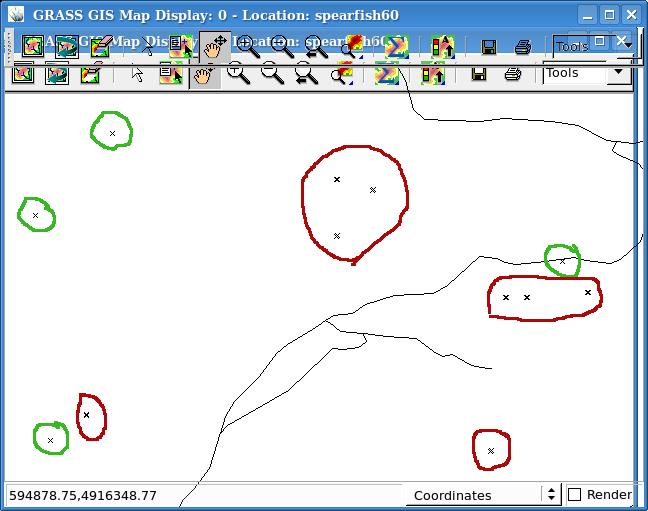
Green - OK; red- shifted points.