
Opened 13 years ago
Closed 12 years ago
#1407 closed enhancement (fixed)
confusing error message after grass7 crash
| Reported by: | MilenaN | Owned by: | martinl |
|---|---|---|---|
| Priority: | blocker | Milestone: | 6.4.2 |
| Component: | wxGUI | Version: | svn-trunk |
| Keywords: | startup | Cc: | grass-dev@… |
| CPU: | Unspecified | Platform: | Unspecified |
Description
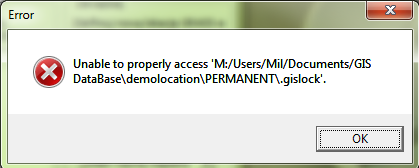
After crashed grass7 session grass complains about .gislock file. The message is unhelpful if the user doesn't know what to do. Please add an explanation for the needed step to fix the blocked grass installation.
Attachments (3)
Change History (17)
by , 13 years ago
| Attachment: | leftover_gislock.png added |
|---|
follow-up: 5 comment:1 by , 13 years ago
Checking with the file expolorer, the indicated file does not exist.
comment:2 by , 13 years ago
| Keywords: | wingrass added |
|---|---|
| Platform: | All → Unspecified |
I think it's related only to Windows...
comment:3 by , 13 years ago
| Keywords: | wingrass removed |
|---|
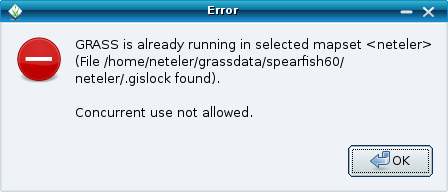
The problem is similar on Linux, see attachment.
follow-ups: 8 12 comment:4 by , 13 years ago
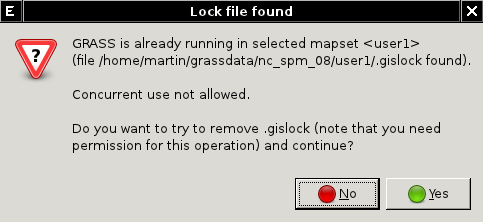
I have modified the dialog to allow remove gislock and continue (r47226) - see the attached screenshot. Would it help?
comment:5 by , 13 years ago
Replying to MilenaN:
Checking with the file expolorer, the indicated file does not exist.
this should only refer to wingrass...
comment:6 by , 13 years ago
| Cc: | added |
|---|---|
| Owner: | changed from to |
| Status: | new → assigned |
comment:7 by , 13 years ago
| Keywords: | wxgui added |
|---|
follow-up: 9 comment:8 by , 13 years ago
follow-up: 10 comment:9 by , 13 years ago
comment:10 by , 13 years ago
| Resolution: | → fixed |
|---|---|
| Status: | assigned → closed |
Replying to martinl:
Replying to martinl:
Replying to martinl:
I have modified the dialog to allow remove gislock and continue (r47226) - see the attached screenshot. Would it help?
Backported to devbr6 in r47246. Testing welcomed.
Before closing the ticket, should it be also backported to
relbr64?
Backported as r48257
comment:11 by , 13 years ago
| Component: | Startup → wxGUI |
|---|---|
| Keywords: | startup added; wxgui removed |
follow-up: 13 comment:12 by , 13 years ago
| Resolution: | fixed |
|---|---|
| Status: | closed → reopened |
Replying to martinl:
I have modified the dialog to allow remove gislock and continue (r47226) -
I would argue to make the warning a lot more dire and the functionality much harder to access.
the user is blocked from starting twice for a good reason, and it's for their own safety whether they realize it or not. Too many people are used to broken software and just click past "an error occurred -> ignore" without thinking about it.
since grass can crash too, or the power go out, etc, sure it's nice to allow recovery without filesystem hacks, but perhaps have it launch a second dialog saying "Are you sure? If you really are running another GRASS session doing this could corrupt your data. Have another look in the processor manager just to be sure.." or something like that.
Hamsih
follow-up: 14 comment:13 by , 13 years ago
| Priority: | normal → blocker |
|---|
Replying to hamish:
the user is blocked from starting twice for a good reason, and it's for their own safety whether they realize it or not. Too many people are used to broken software and just click past "an error occurred -> ignore" without thinking about it.
since grass can crash too, or the power go out, etc, sure it's nice to allow recovery without filesystem hacks, but perhaps have it launch a second dialog saying "Are you sure? If you really are running another GRASS session doing this could corrupt your data. Have another look in the processor manager just to be sure.." or something like that.
Try r48565, backported to devbr in r48566 for testing. Is it better?
comment:14 by , 12 years ago
| Resolution: | → fixed |
|---|---|
| Status: | reopened → closed |




.gislock file present but no idea how to continue