
Opened 12 years ago
Closed 5 years ago
#4484 closed defect (wontfix)
gdalwarp on large netcdf datasets sets data from first input dataset to <nodata> and generates error if -dstnodata option is used with netcdf-4 file
| Reported by: | hsumanto | Owned by: | etourigny |
|---|---|---|---|
| Priority: | normal | Milestone: | closed_because_of_github_migration |
| Component: | default | Version: | unspecified |
| Severity: | normal | Keywords: | netcdf |
| Cc: | etourigny, terryrankine, Even Rouault |
Description
Was trying to combine 2 large netcdf tiles into a single tile using gdalwarp and found a few interesting issues below:
The two large netcdf tiles could found here:
http://staff.vpac.org/~hsumanto/tile_x0_y0.nc
http://staff.vpac.org/~hsumanto/tile_x1_y0.nc
gdalwarp into nc4c with -dstnodata option:
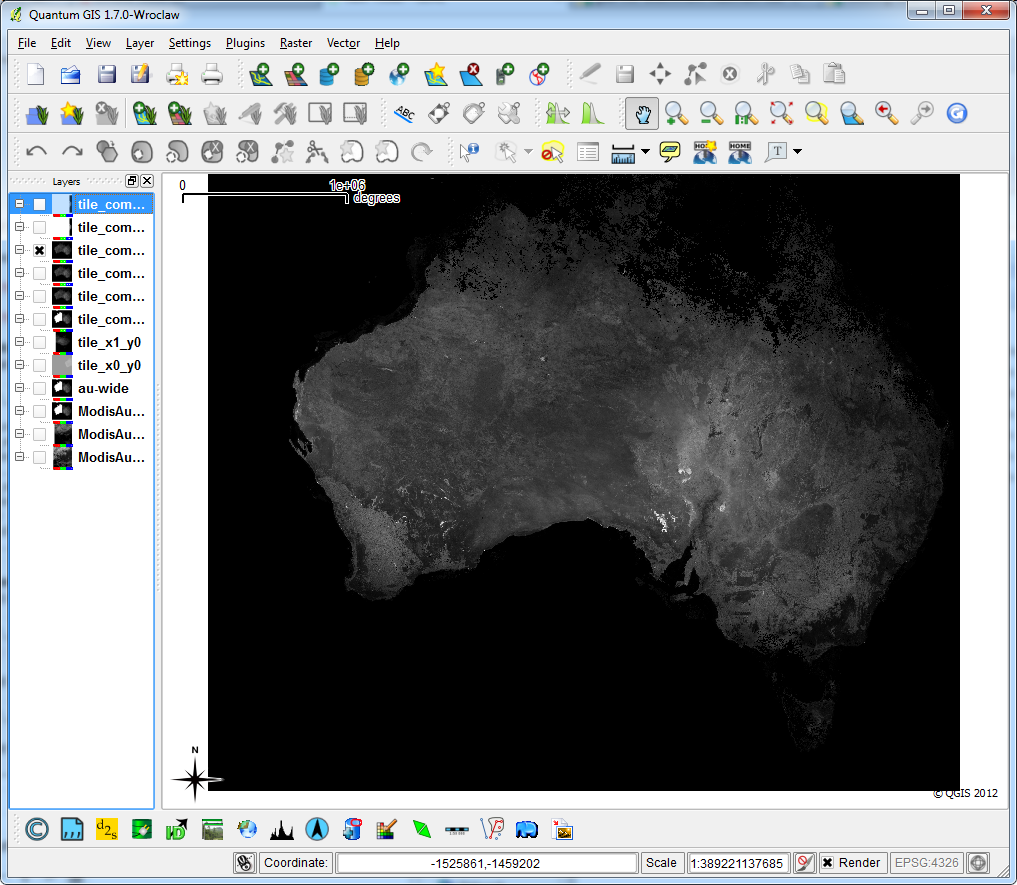
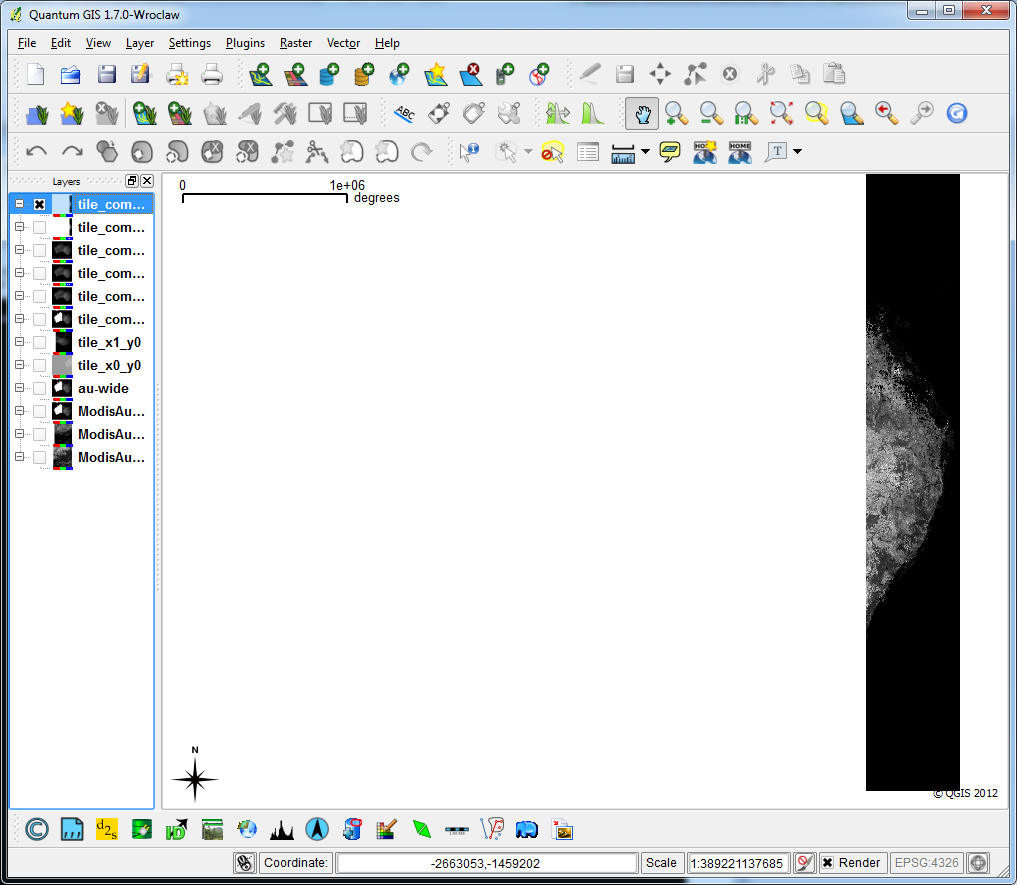
Error encountered and output dataset viewed in QGIS is NOT OK
gdalwarp -tr 500.0 500.0 -t_srs EPSG:3112 -te -2576984.0 -5211665.0 1992016.0 -1219665.0 -r near -dstnodata 9.969209968386869E36 -of netCDF -co COMPRESS=DEFLATE -co ZLEVEL=6 -co FORMAT=NC4C -co WRITE_GDAL_TAGS=yes tile_x0_y0.nc tile_x1_y0.nc tile_combined-nc4c.nc

Creating output file that is 9138P x 7984L.
Processing input file tile_x0_y0.nc.
Using internal nodata values (eg. 9.96921e+36) for image tile_x0_y0.nc.
0...10...20...30...40...50...60...70...80...90...100 - done.
Processing input file tile_x1_y0.nc.
Using internal nodata values (eg. 9.96921e+36) for image tile_x1_y0.nc.
ERROR 1: netcdf error #-122 : NetCDF: Attempt to define fill value when data already exists. .
at (netcdfdataset.cpp,SetNoDataValue,750)
0...10...20...30...40...50...60...70...80...90...100 - done.
gdalwarp into nc4c without -dstnodata option:
No error but output file when viewed in QGIS is NOT OK
gdalwarp -tr 500.0 500.0 -t_srs EPSG:3112 -te -2576984.0 -5211665.0 1992016.0 -1219665.0 -r near -of netCDF -co COMPRESS=DEFLATE -co ZLEVEL=6 -co FORMAT=NC4C -co WRITE_GDAL_TAGS=yes tile_x0_y0.nc tile_x1_y0.nc tile_combined-nc4c_withnodstnodata.nc
gdalwarp into geotiff:
No error and output file when viewed in QGIS is OK
gdalwarp -tr 500.0 500.0 -t_srs EPSG:3112 -te -2576984.0 -5211665.0 1992016.0 -1219665.0 -r near -dstnodata 9.969209968386869E36 tile_x0_y0.nc tile_x1_y0.nc tile_combined-tif.tif
Note: To view nc4c files with QGIS, you might have to convert nc4c into geotiff using gdal_translate as QGIS currently can not open nc4c files directly.
The QGIS screenshots are attached as well.
Attachments (8)
Change History (45)
by , 12 years ago
| Attachment: | output-geotiff.png added |
|---|
comment:1 by , 12 years ago
| Cc: | added |
|---|
comment:2 by , 12 years ago
| Owner: | changed from to |
|---|---|
| Status: | new → assigned |
| Summary: | gdalwarp on large netcdf datasets producing netcdf error #-122 (NetCDF: attempt to define fill value when data already exists) → gdalwarp on large netcdf datasets sets data from first input dataset to <nodata> and generates error if -dstnodata option is used with netcdf-4 file |
The nodata error has been fixed in trunk (r23889), but it was not fatal. I have updated SetNoDataValue() to only update the value when necessary. The error happens because gdalwarp calls SetNoDataValue() for each input dataset, and netcdf-4 does not allow to change the nodata value after data is written.
For netcdf-4 support in qgis, you have to build qgis with gdal-1.9.0, your version probably uses 1.8. ubuntugis-unstable will soon include gdal-1.9.0.
The more serious issue needs more investigation. For some reason the data from the first dataset is set to nodata. If you use the "Value Tool" in QGis, you can see that that data is "null (no data)" rather than "out of extent".
comment:3 by , 12 years ago
I am wondering as well why the data from the first dataset is set to "null (no data)" while it actually contains some data (as shown in tile_combined-tif.tif which is the result of gdalwarp directly into geotiff).
comment:4 by , 12 years ago
Managed to reproduce the same issue on the below case too:
gdalwarp the two input nc4c dataset into nc format with or without -dstnodata option
also set the first dataset into "null (no data)".
gdalwarp -tr 500.0 500.0 -t_srs EPSG:3112 -te -2576984.0 -52116
65.0 1992016.0 -1219665.0 -r near -of netCDF -co FORMAT=NC -co tile_x0_y0.nc tile_x1_y0.nc tile_combined-nc.nc
comment:5 by , 12 years ago
Etienne, this might be helpful information.
If I removed the -t_srs EPSG:3112 from gdalwarp, both the output dataset seems OK as it contains both correct data from the first and second datasets.
Give this a try.
gdalwarp into nc4c with no -t_srs option:
No error and output file when viewed in QGIS is OK
gdalwarp -tr 500.0 500.0 -te -2576984.0 -5211665.0 1992016.0 -1219665.0 -r near -of netCDF -co COMPRESS=DEFLATE -co ZLEVEL=6 -co FORMAT=NC4C -co WRITE_GDAL_TAGS=yes tile_x0_y0.nc tile_x1_y0.nc tile_combined-nc4c_withnosrs.nc
The issue needs more investigation now: why the first dataset is set to "null (no data)" when gdalwarp is run with -t_srs EPSG:3112 option.
comment:6 by , 12 years ago
Ignore my previous post, we could still reproduce the issue with or without -t_srs EPSG:3112 option. Sorry for making that mistake.
comment:7 by , 12 years ago
The problem is because the warp operation uses chunking when data exceeds a certain threshold. The last chunk that is warped is written to file, but the previous chunks are overwritten to default values (nodata). The netcdf driver has not been designed with chunked IO in mind, so I need some time to sort out what is missing.
Try using --debug=on you will see various lines like
GDAL: GDALWarpKernel()::GWKGeneralCase()
Src=5397,573,1143x1996 Dst=0,0,1142x1996

GDAL: GDALWarpKernel()::GWKGeneralCase()
Src=6539,573,1143x1996 Dst=1142,0,1142x1996
In the meantime, the following work-around seems to work (at least on my machine, using your datasets) and also speeds up the process considerably: add the parameters '--config GDAL_CACHEMAX 1000 -wm 1000' to the command line. A larger dataset/data type will require larger cache values. See http://trac.osgeo.org/gdal/wiki/UserDocs/GdalWarp#WillincreasingRAMincreasethespeedofgdalwarp for more info.
comment:9 by , 11 years ago
Hi Etienne,
Will you be attempting to fix this issue so that the netcdf driver could be designed with chunked IO in mind?
We are now experiencing the same issue when warping to larger dataset even after setting --config GDAL_CACHEMAX 1000 -wm 1000
Keep increasing the cache value to higher number might be able to help us solve the issue on some cases but not all as it is not really the ideal solution. Also not sure how high we could keep increasing the cache value as the will be always limitation on how much memory you could allocate for gdalwarp.
It would be great if a permanent solution could be achieved.
Thanks Etienne.
Hendy
comment:10 by , 11 years ago
Hi Hendy,
in fact I just ran into a problem when reading netcdf-4 files with chunking and compression. I have a fix almost ready, I would post the patch here and ask you if it resolves this issue.
Thanks Etienne
by , 11 years ago
| Attachment: | patch-chunking.txt added |
|---|
patch against trunk to support chunking - read only
comment:11 by , 11 years ago
I've just attached a patch to support chunked IO for reading - although I just realized that gdalwarp would require chuking in writing also...
comment:12 by , 11 years ago
Thanks for the patch, Etienne. Really appreciate it. I will test the chunked IO patch today and give you feedback of my test asap.
Will you be planning to release patch to support chunked IO in writing? I will be able to test it directly as I have a few tests which could reproduce this bug.
comment:13 by , 11 years ago
Hi,
sorry I won't have time for that at least for a few weeks. I suggest you use a large cache settings in the meantime.
comment:14 by , 11 years ago
Hi Etienne,
The sample tiles which are attached is good example as I think they make gdalwarp do chunking, even when 1000mb is specified as -wm (warp memory size).
You could get the sample tiles from [1] [1] http://staff.vpac.org/~hsumanto/tiles.zip
I tried gdal with the patch-chunking.txt to warp the sample tiles and it seems to take forever.
$ gdalwarp -tr 25.0 25.0 -r bilinear -of netCDF -dstnodata "-999" -te 458125.0 -2453400.0 879225.0 -1600650.0 --config GDAL_CACHEMAX 1000 -wm 1000 -co COMPRESS=DEFLATE -co ZLEVEL=6 -co FORMAT=NC4C -co WRITE_GDAL_TAGS=yes *.nc output-new-patch.nc
Creating output file that is 16844P x 34110L.
Processing input file B10_tile_x25_y10.nc.
Using internal nodata values (eg. -999) for image B10_tile_x25_y10.nc.
0...10...20...30...40...50...60...70...80...90...100 - done.
STILL RUNNING (SEEMS TAKING FOREVER)
So I have to increase the warp memory size to 2000mb and run the below command. It seems that chunking for reading might be used here (the input tiles are all read) but writing the output file takes forever. This might due to there is no support yet for chunking in writing.
Thus this test demonstrated what you said in previous comment that gdalwarp still requires chunking in writing too.
Once you have time to implement chunking in writing, I should be able to re-do the testing again. Thanks, Etienne.
$ gdalwarp -tr 25.0 25.0 -r bilinear -of netCDF -dstnodata "-999" -te 458125.0 -2453400.0 879225.0 -1600650.0 --config GDAL_CACHEMAX 2000 -wm 2000 -co COMPRESS=DEFLATE -co ZLEVEL=6 -co FORMAT=NC4C -co WRITE_GDAL_TAGS=yes *.nc output-new-patch2.nc
Creating output file that is 16844P x 34110L.
Processing input file B10_tile_x25_y10.nc.
Using internal nodata values (eg. -999) for image B10_tile_x25_y10.nc.
0...10...20...30...40...50...60...70...80...90...100 - done.
Processing input file B10_tile_x25_y11.nc.
Using internal nodata values (eg. -999) for image B10_tile_x25_y11.nc.
0...10...20...30...40...50...60...70...80...90...100 - done.
Processing input file B10_tile_x25_y8.nc.
Using internal nodata values (eg. -999) for image B10_tile_x25_y8.nc.
0...10...20...30...40...50...60...70...80...90...100 - done.
Processing input file B10_tile_x25_y9.nc.
Using internal nodata values (eg. -999) for image B10_tile_x25_y9.nc.
0...10...20...30...40...50...60...70...80...90...100 - done.
Processing input file B10_tile_x26_y10.nc.
Using internal nodata values (eg. -999) for image B10_tile_x26_y10.nc.
0...10...20...30...40...50...60...70...80...90...100 - done.
Processing input file B10_tile_x26_y11.nc.
Using internal nodata values (eg. -999) for image B10_tile_x26_y11.nc.
0...10...20...30...40...50...60...70...80...90...100 - done.
Processing input file B10_tile_x26_y4.nc.
Using internal nodata values (eg. -999) for image B10_tile_x26_y4.nc.
0...10...20...30...40...50...60...70...80...90...100 - done.
Processing input file B10_tile_x26_y5.nc.
Using internal nodata values (eg. -999) for image B10_tile_x26_y5.nc.
0...10...20...30...40...50...60...70...80...90...100 - done.
Processing input file B10_tile_x26_y6.nc.
Using internal nodata values (eg. -999) for image B10_tile_x26_y6.nc.
0...10...20...30...40...50...60...70...80...90...100 - done.
Processing input file B10_tile_x26_y7.nc.
Using internal nodata values (eg. -999) for image B10_tile_x26_y7.nc.
0...10...20...30...40...50...60...70...80...90...100 - done.
Processing input file B10_tile_x26_y8.nc.
Using internal nodata values (eg. -999) for image B10_tile_x26_y8.nc.
0...10...20...30...40...50...60...70...80...90...100 - done.
Processing input file B10_tile_x26_y9.nc.
Using internal nodata values (eg. -999) for image B10_tile_x26_y9.nc.
0...10...20...30...40...50...60...70...80...90...100 - done.
Processing input file B10_tile_x27_y10.nc.
Using internal nodata values (eg. -999) for image B10_tile_x27_y10.nc.
0...10...20...30...40...50...60...70...80...90...100 - done.
Processing input file B10_tile_x27_y11.nc.
Using internal nodata values (eg. -999) for image B10_tile_x27_y11.nc.
0...10...20...30...40...50...60...70...80...90...100 - done.
Processing input file B10_tile_x27_y4.nc.
Using internal nodata values (eg. -999) for image B10_tile_x27_y4.nc.
Processing input file B10_tile_x27_y5.nc.
Using internal nodata values (eg. -999) for image B10_tile_x27_y5.nc.
0...10...20...30...40...50...60...70...80...90...100 - done.
Processing input file B10_tile_x27_y6.nc.
Using internal nodata values (eg. -999) for image B10_tile_x27_y6.nc.
0...10...20...30...40...50...60...70...80...90...100 - done.
Processing input file B10_tile_x27_y7.nc.
Using internal nodata values (eg. -999) for image B10_tile_x27_y7.nc.
0...10...20...30...40...50...60...70...80...90...100 - done.
Processing input file B10_tile_x27_y8.nc.
Using internal nodata values (eg. -999) for image B10_tile_x27_y8.nc.
0...10...20...30...40...50...60...70...80...90...100 - done.
Processing input file B10_tile_x27_y9.nc.
Using internal nodata values (eg. -999) for image B10_tile_x27_y9.nc.
0...10...20...30...40...50...60...70...80...90...100 - done.
Processing input file B10_tile_x28_y4.nc.
Using internal nodata values (eg. -999) for image B10_tile_x28_y4.nc.
0...10...20...30...40...50...60...70...80...90...100 - done.
Processing input file B10_tile_x28_y5.nc.
Using internal nodata values (eg. -999) for image B10_tile_x28_y5.nc.
0...10...20...30...40...50...60...70...80...90...100 - done.
Processing input file B10_tile_x28_y6.nc.
Using internal nodata values (eg. -999) for image B10_tile_x28_y6.nc.
0...10...20...30...40...50...60...70...80...90...100 - done.
Processing input file B10_tile_x28_y7.nc.
Using internal nodata values (eg. -999) for image B10_tile_x28_y7.nc.
0...10...20...30...40...50...60...70...80...90...100 - done.
Processing input file output-new-patch.nc.
Using internal nodata values (eg. -999) for image output-new-patch.nc.
STILL RUNNING (SEEMS TAKING FOREVER)
comment:15 by , 11 years ago
Similarly if I re-run the first test case as below (using the above patch), it also take forever.
gdalwarp -tr 500.0 500.0 -t_srs EPSG:3112 -te -2576984.0 -5211665.0 1992016.0 -1219665.0 -r near -dstnodata 9.969209968386869E36 -of netCDF -co COMPRESS=DEFLATE -co ZLEVEL=6 -co FORMAT=NC4C -co WRITE_GDAL_TAGS=yes tile_x0_y0.nc tile_x1_y0.nc tile_combined-nc4c.nc
STILL RUNNING (SEEMS TAKING FOREVER)
comment:16 by , 11 years ago
Etienne, would you mind if I ask in few weeks time when roughly you will be attempting to incorporate netcdf chunking in writing. For estimation, how long roughly the effort required to perform this.
comment:17 by , 11 years ago
Hi Etienne, do you by any chance have time to have a look back at this chunking feature for writing now?
comment:18 by , 11 years ago
Hi Hendy,
sorry I will not have time in the foreseeable future (this year). Perhaps if your agency is willing to fund this work I could look into it, but most probably not before next year, sorry.
comment:20 by , 11 years ago
| Cc: | added |
|---|
from bug #4974 (onestep vs twosteps warping to netcdf):
Warp vs Warp+Translate

 http://osgeo-org.1560.n6.nabble.com/onestep-vs-twostep-reproject-and-change-format-tc5030451.html

I am unable to make the warp work in one step. I am assuming that it is a bug, and if its not - having it in here will help others.
This problem is also due to lack of chunking support for writing operations in the netcdf driver. THe left part of the image is probably filled with "nodata" values.
Workaround is to use a large enough cache size by adding these arguments to gdalwarp (size depends on dataset):
--config GDAL_CACHEMAX 1000 -wm 1000
Does that work for you?
Another workaround which saves space would be to gdalwarp to a vrt file (instead of an ERS file), then gdal_translate to destination netcdf file.
follow-up: 22 comment:21 by , 11 years ago
I had been using --config GDAL_CACHEMAX 1000 -wm 1000 when I reproduced the same bug so Etienne is right the issue is because of lack of chunking support for writing operation.
I have also tried to increase them to --config GDAL_CACHEMAX 2000 -wm 2000 but that is not a workaround either as we managed to reproduce the same issue.
The only workaround which is working at the moment for me is to gdalwarp many nc tiles to a single geotiff and then gdal_translate that single geotiff tile back to a single netcdf tile (we are using this two steps methods as described by terryrankine). But the two steps definitely is taking much longer time.
comment:22 by , 11 years ago
Replying to hsumanto:
I had been using --config GDAL_CACHEMAX 1000 -wm 1000 when I reproduced the same bug so Etienne is right the issue is because of lack of chunking support for writing operation.
I have also tried to increase them to --config GDAL_CACHEMAX 2000 -wm 2000 but that is not a workaround either as we managed to reproduce the same issue.
I guess for the particular dataset 2000MB is not enough - more would be needed in this case.
The only workaround which is working at the moment for me is to gdalwarp many nc tiles to a single geotiff and then gdal_translate that single geotiff tile back to a single netcdf tile (we are using this two steps methods as described by terryrankine). But the two steps definitely is taking much longer time.
Have you tried warping to vrt instead of gtiff? It should reduce time as well as space.
comment:23 by , 11 years ago
Haven't tried it yet but will do it next time. warping to vrt and then translate back to nc should be faster and more efficient in storage. Thanks, Etienne.
by , 11 years ago
| Attachment: | patch-ubyte_chunk-autotest.txt added |
|---|
patch for this and also #5053 - test
comment:26 by , 11 years ago
I encountered a similar problem trying to reproject and convert a GRIB2 message to NetCDF using gdalwarp, where the NetCDF file appeared to be cropped west of a certain longitude. In actuality the data were present but were defined as missing values (NoData) in the blank region.
An example of the source GRIB2 file can be downloaded at ftp://tgftp.nws.noaa.gov/SL.us008001/ST.expr/DF.gr2/DC.ndfd/AR.conus/VP.001/ds.wspd.bin (however the URL may change from "/ST.expr/" to "/ST.opnl/" in the future).
Following an e-mail to the mailing list, Etienne showed me the workaround of using --config GDAL_CACHEMAX and -wm, which solved my problem by using a value of 2000 (a value of 1000 worked for some cases, but not all).
The resulting command is as follows:
gdalwarp -wm 2000 --config GDAL_CACHEMAX 2000 -of netcdf -srcnodata 9999.0 -dstnodata 9999.0 -t_srs EPSG:4326 conus-wspd-01.bin conus-wspd-01.nc
comment:27 by , 11 years ago
| Cc: | added |
|---|
Even - would it be possible (and advisable) when doing a warp operation with destination netcdf file, to detect this problem? (i.e. detect when the warp buffer is full and destination format is netcdf). I would like to print a warning when this happens. I do not see a permanent fix for this in the near future.
comment:28 by , 11 years ago
Etienne, I've skimmed quickly through the issue and don't really understand why the netCDF driver doesn't support warping, but that's not really a problem ;-) I see that it has both IReadBlock() and IWriteBlock() implementation, so I imagine that it is perhaps the issue of alternativing IReadBlock() / IWriteBlock(), or that IWriteBlock() doesn't support writing in random order. Couldn't the access pattern that currently causes problem be detected in the driver itself instead of hacking the gdalwarp utility ? One could imagine user code that has similar access pattern as gdalwarp, which would lead to the same bug...
comment:29 by , 11 years ago
Even, well it does support warping, but when I implemented the Create() operation (and updated IWriteBlock()), I didn't consider writing by chunks. So If the chunk cache is large enough, it works.
Ideally the access pattern shoould be detected in the driver itself - probably in IWriteBlock, if the blocks are not of the same size as the dataset itself.
comment:30 by , 11 years ago
I still think that your explanation is missing something. The size of the warping chunk doesn't change the size of the data written by IWriteBlock(). It can perhaps change the order in which they are called. Or perhaps make a same block being written several time (and potentially read) if it is crossing warping chunks.
comment:31 by , 11 years ago
I think you explained it perfectly... let's say there are 2 warping operations (because of a smaller warping buffer than needed), the second operation overwrites the first portion also, but puts in nodata (because that section is not part of the warping operation). I'll have a look at the code and see if I can understand better. Thanks.
comment:32 by , 11 years ago
Further inspection reveals that there are multiple calls to IWriteBlock on the same data block, interspersed with calls to IReadBlock (a portion is warped, entire block is written, then entire block is read, another portion is warped, entire block written).
My understanding is that IWriteBlock() does not write to disk before closing the dataset, and IReadBlock does not read the new values, but all nodata values. This is likely related to libnetcdf and not the chunk handling in the driver. I tried calling nc_sync() which makes the writes much slower, but does not solve the issue...
comment:33 by , 11 years ago
Yes, the pattern you describe is typical of the access pattern of the warping engine. A way to workaround this is to pass the OPTIMIZE_SIZE=YES warping option (-wo OPTIMIZE_SIZE=YES on gdalwarp commandline) which should avoid re-writing several times the same block, and should also likely prevent reading a block that has been partially written. Note that this option can slow down the warping significantly depending on the type of reprojection : http://www.gdal.org/structGDALWarpOptions.html#a0ed77f9917bb96c7a9aabd73d4d06e08
comment:34 by , 11 years ago
Even, yes that option works, but it takes a very long time (using this test dataset, 17 seconds as opposed to 2 seconds when the cache is set to a large size).
As I am not sure how to fix the driver in a correct manner (I have not found a way to make sure that the new values are read in IWriteBlock), I see 2 solutions
1) detect when this access happens and warn the user (in the netcdf driver) 2) set warp cache or OPTIMIZE_SIZE=YES from within the Create function in the netcdf driver. This may be dangerous though.
any thoughts?
How would I detect these access patterns? Is there some value in the warping engine which can be queried? Or something as basic as counting how many times IWriteBlock has been called for the same block?
many thanks!
comment:35 by , 11 years ago
I would really go for detecting the the block is written more than once, if it is really the issue (I speak under your control. The issue might perhaps rather be write/read or write/read/write ?). An array of counter/boolean per block should do it indeed. When the unsupported access pattern is detected, issue a warning telling that if it happens during warping, OPTIMIZE_SIZE=YES can be attempted (if you want to emit the message selectively, you can run CPLGetExecPath() and check if the binary name contains "gdalwarp"). But there are other GDAL utilities that could be unhappy with the limitation of the driver (this is not a criticism of your work ! I'm well aware of technical limitations related to formats or used libraries), like nearblack that alternates several times read/write/read/write.
comment:36 by , 11 years ago
ok, thanks again for the info and suggestions.
I have a simple patch that warns when sequential calls to IWriteBlock() are made for same block. It is triggered when the error happens, so it's good enough for me. Not sure about other applications, most complaints are related to gdalwarp, as most users of this driver will use gdalwarp or gdal_translate.
comment:37 by , 5 years ago
| Milestone: | → closed_because_of_github_migration |
|---|---|
| Resolution: | → wontfix |
| Status: | assigned → closed |
This ticket has been automatically closed because Trac is no longer used for GDAL bug tracking, since the project has migrated to GitHub. If you believe this ticket is still valid, you may file it to https://github.com/OSGeo/gdal/issues if it is not already reported there.



The geotiff output file viewed in QGIS