
Opened 14 years ago
Closed 14 years ago
#3254 closed enhancement (fixed)
gdalbuildvrt create raster with collars in overlapped area
| Reported by: | brushtyler | Owned by: | warmerdam |
|---|---|---|---|
| Priority: | normal | Milestone: | 1.7.0 |
| Component: | GDAL_Raster | Version: | 1.6.2 |
| Severity: | normal | Keywords: | |
| Cc: |
Description
Using buildvrt, if there are rasters with a collar, the result is a map that have white strips in overlapped area. Related QGis ticket.
Attachments (6)
Change History (9)
by , 14 years ago
| Attachment: | screenshot.jpg added |
|---|
comment:1 by , 14 years ago
General note: Your bug report doesn't provide enough infos for us to reproduce and understand if it is a bug or an expected behaviour. The vrt file and small underlying rasters that enable to reproduce the behaviour you see are necessary.
I'd like to remind that gdalbuildvrt is not meant at solving all possible situations. It's main objective is to help in mosaicing perfectly tiled data without overlapping... The manual of the utility recalls that : "If there is some amount of spatial overlapping between files, the order may depend on the order they are inserted in the VRT file, but this behaviour should not be relied on."
Does your source raster have nodata values, an alpha band or just white collars ? I'd note that gdalbuildvrt in trunk (1.7.0dev) brings support for nodata values, so that might help (otherwise the last comment in the QGIS ticket is a possible work around with manual editing)
comment:2 by , 14 years ago
Replying to rouault:
General note: Your bug report doesn't provide enough infos for us to reproduce and understand if it is a bug or an expected behaviour. The vrt file and small underlying rasters that enable to reproduce the behaviour you see are necessary.
You're right. The sources are 2 b/w tiff files (1 band) with white collars. I'm attempting to create 2 small tiffs to attach.
I'd like to remind that gdalbuildvrt is not meant at solving all possible situations. It's main objective is to help in mosaicing perfectly tiled data without overlapping... The manual of the utility recalls that : "If there is some amount of spatial overlapping between files, the order may depend on the order they are inserted in the VRT file, but this behaviour should not be relied on."
Sure, but if the tool can resolve this problem (that it's no just mine), could be a good thing making a little effort in this way.
Does your source raster have nodata values, an alpha band or just white collars ? I'd note that gdalbuildvrt in trunk (1.7.0dev) brings support for nodata values, so that might help (otherwise the last comment in the QGIS ticket is a possible work around with manual editing)
As sources I've used tiff files without nodata value or alfa band. Using the trick found in qgis ticket, the output raster is perfect. Instead, I don't already tried the trunk version of gdalbuildvrt (i'm installing it, I'll say you if it work fine in this case).
comment:3 by , 14 years ago
| Milestone: | → 1.7.0 |
|---|---|
| Resolution: | → fixed |
| Status: | new → closed |
| Type: | defect → enhancement |
Enhancement implemented in :
r18146 /trunk/gdal/apps/ (gdal_utilities.dox gdalbuildvrt.cpp): gdalbuildvrt: add -srcnodata and -vrtnodata options, similar to the ones of gdalwarp, to set/override/unset the nodata settings at the source level and the VRTRasterBand level (#3254)
r18147 /trunk/autotest/utilities/test_gdalbuildvrt.py: Add test for -srcnodata option of gdalbuildvrt (#3254)
--> For your use case, 'gdalbuildvrt -srcnodata 0 out.vrt 250010.tif 250020.tif' should do.


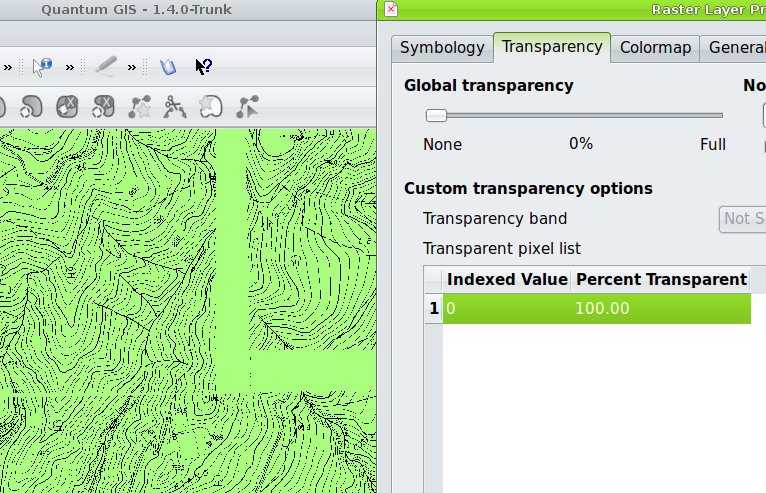
collars remain after transparency setting